

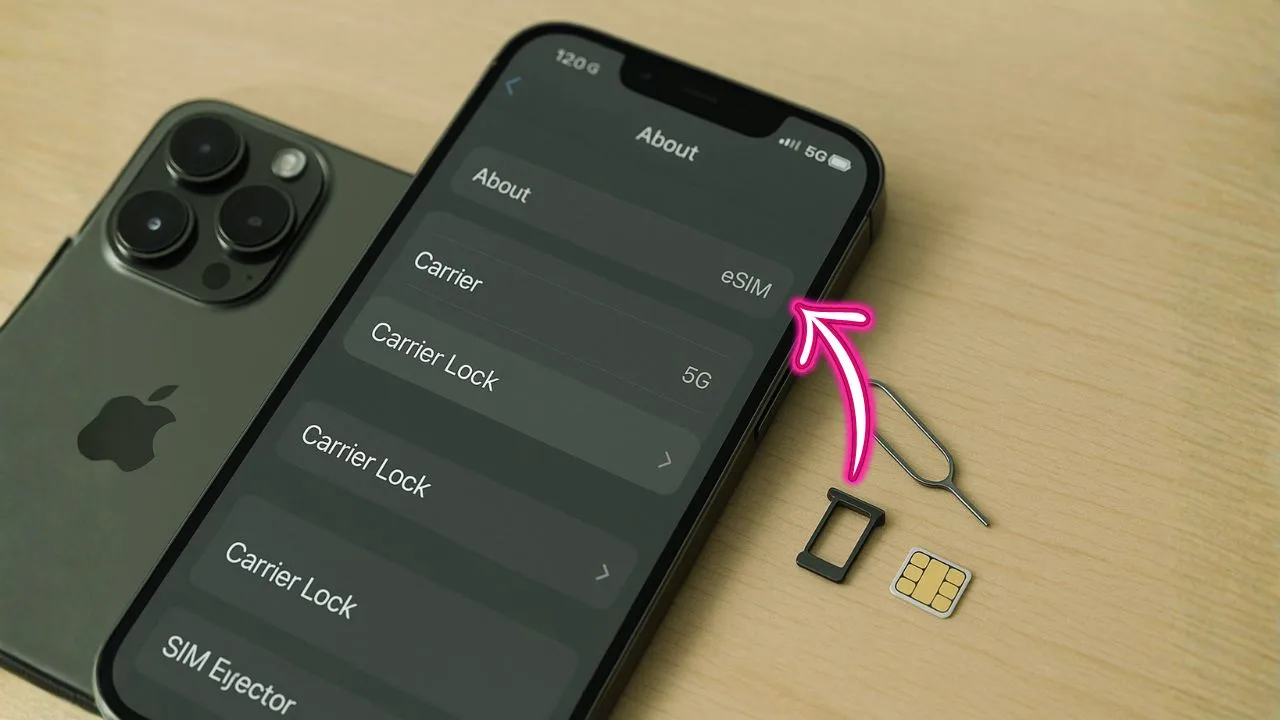
The iPhone 13 Pro Max is still a powerhouse. With a top-tier A15 Bionic chip, great battery life, and ProMotion display, it holds up well for work, travel, photos, and gaming. But if you want the most freedom and value, the version you should look for is the iPhone 13 Pro Max unlocked. An unlocked phone is not tied to any one carrier. You can pop in a SIM, add an eSIM, or switch plans without paying extra fees or waiting on hold with support. This guide explains what “unlocked” really means, how to check it, how to activate eSIM or a physical SIM, the best ways to buy, and what to watch out for when you shop refurbished or used.
We’ll keep it clear and simple, focusing on the exact steps you can follow today. You’ll also find quick answers on 5G support, dual-SIM, traveling with an unlocked device, and the difference between a carrier lock and Apple’s Activation Lock. If you’re comparing “factory unlocked iPhone 13 Pro Max” vs a cheaper carrier model, this guide will help you decide with confidence.
Key Takeaways
- Unlocked = maximum flexibility. An unlocked iPhone 13 Pro Max lets you pop in any SIM or add an eSIM, switch carriers for better prices, and use cheap travel data abroad—no carrier approval needed.
- Real-world price range. Current listings you shared span roughly $297–$599+ depending on condition, storage, and seller: Amazon Renewed (128GB Sierra Blue), Best Buy pre-owned (often 256GB), Walmart “Restored” (128GB Graphite), Gazelle with 30-day returns, and marketplace/pre-owned deals around the $380–$430 band.
- Verify before you buy. On the phone, go to Settings → General → About → Carrier Lock and confirm “No SIM restrictions.” Also ensure the device is not Activation-Locked, check IMEI isn’t blacklisted, and read listings that say “READ DESC” for any hidden issues.
- Condition and battery matter more than color. Prefer sellers that state battery health (aim for ≥85–90%), offer a clear return window and warranty, and disclose any refurb work (battery/shell replaced). Storage choice: 128GB saves money, 256GB is better if you shoot lots of video.
- Performance still holds up. The iPhone 13 Pro Max (A15, ProMotion, strong cameras) remains fast in 2025 and supports 5G. Unlocked + dual-SIM (nano-SIM + eSIM) makes it ideal for work/personal lines or travel without changing your primary number.
What “Unlocked” Means (And Why It Matters)
An unlocked iPhone 13 Pro Max can use service from any compatible carrier. There is no network restriction in the software. You can insert any working nano-SIM, add an eSIM plan, or switch carriers whenever you want.
Why people choose unlocked:
- Freedom to switch: Try different plans to get the best price, coverage, or data speed—without waiting for your current carrier to approve an unlock.
- Easy travel: Buy a local eSIM or prepaid SIM when you land. Keep your home number active for banking codes while using a local data plan.
- Better resale value: Unlocked phones usually sell faster and at a higher price.
- Dual-SIM made simple: Run two numbers at once (e.g., personal and work, or home and travel) with one physical SIM plus one eSIM.
📖 Also Read: Buy iPhone 14 Pro Max Unlocked: How to Check, Activate, and Save on Service
How To Check If Your iPhone 13 Pro Max Is Unlocked
You don’t need special tools to check. Use the phone itself:
- Open Settings → General → About.
- Scroll to Carrier Lock.
- If it shows No SIM restrictions, your iPhone is unlocked. If it lists a carrier, the phone is locked to that network.
You can also test with another SIM. If it activates and you can call, text, and use data, it’s unlocked. If you see “SIM Not Supported” or it only works with one carrier’s SIM, it’s still locked.
Tip: “Carrier lock” is different from Activation Lock (Apple’s anti-theft feature). Activation Lock ties the device to an Apple ID and shows “iPhone Locked to Owner.” That requires the original Apple ID and password to remove. A phone can be carrier unlocked but still Activation-Locked (and vice versa). When buying used, make sure both are clear: “No SIM restrictions” and no Activation Lock.
eSIM and Dual-SIM on iPhone 13 Pro Max
The iPhone 13 Pro Max supports dual-SIM: one nano-SIM and one eSIM. This combo is perfect if you want to keep your main number on the physical SIM and add a second plan digitally.
How eSIM works:
- You scan a QR code from a carrier, use the carrier’s app, or complete eSIM Quick Transfer from an old iPhone.
- In Settings → Cellular, tap Add eSIM and follow the prompts.
- You can label lines (e.g., Primary, Travel) and choose which line handles data, calls, or iMessage.
Travel tip: Keep your home number active for iMessage and banking OTPs. Set your Travel eSIM as the Cellular Data line to avoid roaming fees.
5G, Bands, and Real-World Coverage
The iPhone 13 Pro Max supports 5G Sub-6 everywhere and mmWave 5G on certain variants (notably many U.S. models). Sub-6 gives broad coverage with speeds that feel like fast LTE or better. mmWave is ultra-fast but is only in certain cities and hot spots.
Real-world advice:
- If you live in the U.S. and care about mmWave (stadiums, downtown areas), look for a U.S. model with the small mmWave antenna window on the side.
- If you mainly want reliable coverage and better battery life, Sub-6 support is what you’ll use most of the time.
- An unlocked phone lets you try different carriers’ 5G where you live. Coverage maps are helpful, but testing in your neighborhood is best.
📖 Also Read: Unlocked iPhone: The Clear, Practical Guide for Everyday Buyers (2025)
Unlocked vs. Locked: Cost, Control, and Hidden Rules
A carrier-locked iPhone may look cheaper at checkout, but it usually comes with strings attached: a contract, monthly device payments, or an unlock wait period. Many carriers unlock automatically after certain requirements are met, but the timing and rules differ by company and can change.
Unlocked advantages:
- No unlock waiting: No calls, no forms, no “X months of service first.”
- Easy plan hopping: Switch from an unlimited plan to a cheaper plan during slow months.
- Instant resale: Sell or gift the phone without worrying about the buyer’s carrier.
If you’re eyeing a factory unlocked iPhone 13 Pro Max, you’re paying for flexibility and time saved later. For many users, that added value pays for itself within the first year.
Buying an Unlocked iPhone 13 Pro Max: New, Renewed, or Used?
You have three main paths: New, Renewed/Refurbished, or Used/Private Party. Each has pros and cons.
New (factory unlocked)
Pros: Full warranty, fresh battery and shell, no risk of hidden locks, and the cleanest setup.
Cons: Highest price and smaller discounts compared to used.
Renewed/Refurbished (unlocked)
Pros: Big savings with testing, grading (Excellent/Good/Fair), and return policies. Many refurbishers replace the battery and outer shell.
Cons: Grades vary by seller; always read the warranty terms and battery health promises.
Used/Private Party (unlocked)
Pros: Lowest prices, room to negotiate.
Cons: Higher risk. You must verify Carrier Lock (No SIM restrictions), check Activation Lock, inspect the phone carefully, and confirm the IMEI isn’t blacklisted (reported lost or with unpaid bills).
Smart checks before you buy:
- See “No SIM restrictions” in Settings → General → About.
- Check Activation Lock on the setup screen (if reset) or have the seller sign out of iCloud in front of you.
- Inspect the physical condition: screen, lenses, ports, frame.
- Battery health: In Settings → Battery → Battery Health & Charging. Expect some wear; 85–90% is common on used units.
- Verify IMEI with the seller’s carrier if possible to ensure it’s not blacklisted.
- Get a simple bill of sale with IMEI, price, date, and both names.
How To Activate an Unlocked iPhone 13 Pro Max (Physical SIM or eSIM)
Physical SIM setup:
- Power off the phone.
- Insert your nano-SIM using the SIM eject tool.
- Power on and follow the on-screen activation steps.
- If asked, install the Carrier Settings Update.
eSIM setup:
- Connect to Wi-Fi.
- Go to Settings → Cellular → Add eSIM.
- Choose Use QR Code or the Carrier App path, or Transfer From Nearby iPhone if your old iPhone supports quick transfer.
- Assign the line label and pick which line handles data, calls, and iMessage.
Switching data lines (dual-SIM):
Go to Settings → Cellular → Cellular Data and select the line you want for data. You can still receive calls on both lines if coverage allows.
Troubleshooting Common Activation and Network Issues
If your iPhone 13 Pro Max is unlocked but you’re stuck on activation or data:
- Update iOS: Go to Settings → General → Software Update.
- Install Carrier Settings: Settings → General → About, wait for a prompt.
- Reset Network Settings: Settings → General → Transfer or Reset iPhone → Reset → Reset Network Settings. You’ll rejoin Wi-Fi after this.
- Check APN/Data Settings: Some smaller carriers need a specific APN profile. Most install automatically; if not, the carrier can provide manual values.
- Test another SIM or eSIM: Confirms whether the issue is with the plan rather than the phone.
- Remove and re-add eSIM: If an eSIM gets corrupted, deleting and re-adding often fixes things.
- “SIM Not Supported”: Usually means the phone is still locked. Recheck Carrier Lock. If it shows a carrier name, contact that carrier to unlock.
📖 Also Read: How to Unlock an iPhone Without a Password
Using an Unlocked iPhone 13 Pro Max for International Travel
This is where unlocked shines. You can keep your home number for banking and iMessage, then add a local eSIM for cheap data abroad. Many providers sell short-term eSIMs you can activate in minutes.
Travel setup plan:
- Before you fly, back up your phone, update iOS, and make sure it says No SIM restrictions.
- Buy a travel eSIM ahead of time or at the airport.
- After installation, set Cellular Data to the travel plan while keeping your home line for calls and iMessage if needed.
- Turn on Wi-Fi Calling on your home line if your carrier supports it.
- Use Low Power Mode on long sightseeing days to stretch battery life.
Performance and Battery Life: Still Worth It in 2025?
Yes. The A15 Bionic, 120Hz ProMotion display, and large battery keep the iPhone 13 Pro Max fast and smooth. It handles heavy apps, long GPS sessions, and 4K video recording without breaking a sweat. If you’re choosing between a newer mid-range phone and an unlocked iPhone 13 Pro Max, the 13 Pro Max often feels more premium with better battery life and camera consistency.
Battery health tip: On used units, you can replace the battery and still enjoy years of daily use. iOS smart charging and Optimized Battery Charging help slow down wear.
iMessage, FaceTime, and eSIM Line Settings
If you run dual lines, set which number iMessage and FaceTime use:
- Settings → Messages → Send & Receive.
- Choose the number(s) and Apple ID you want.
- In Settings → FaceTime, do the same.
For calls, you can set Default Voice Line in Settings → Cellular. You can also choose Ask Every Time so you pick the line per call.
What About Hotspot and Tethering?
An unlocked phone doesn’t guarantee hotspot access—the plan does. Most carriers include hotspot on certain plans only. If hotspot won’t turn on:
- Make sure your plan includes it.
- Sign out and back into your carrier app.
- Install any pending carrier updates.
- Toggle Low Data Mode off if speeds are slow.
Choosing a Carrier for an Unlocked iPhone 13 Pro Max
The best network depends on your location and budget. Start with what matters most:
- Coverage near home, work, and school: Test with friends’ SIMs or short prepaid plans.
- Data speed vs price: Some low-cost plans cap speed after a certain amount.
- International roaming needs: Travelers may prefer carriers that include free texts/data abroad.
- Hotspot, Wi-Fi Calling, Visual Voicemail: Make sure the plan supports the features you need.
Because the phone is unlocked, you can try a few options and keep the one that fits. That’s the main win.
Choosing a Carrier for an Unlocked iPhone 13 Pro Max
The best network depends on your location and budget. Start with what matters most:
- Coverage near home, work, and school: Test with friends’ SIMs or short prepaid plans.
- Data speed vs price: Some low-cost plans cap speed after a certain amount.
- International roaming needs: Travelers may prefer carriers that include free texts/data abroad.
- Hotspot, Wi-Fi Calling, Visual Voicemail: Make sure the plan supports the features you need.
Because the phone is unlocked, you can try a few options and keep the one that fits. That’s the main win.
Trade-In and Resale: Unlocked Often Wins
If you plan to upgrade later, an unlocked 13 Pro Max usually sells for more and faster. Buyers like the flexibility. Keep the box and cable, take clear photos, and note battery health and any repairs. If you used AppleCare or replaced the battery, include proof.
Frequently Asked Questions
Is the iPhone 13 Pro Max still a good buy in 2025?
Absolutely. The A15 chip, cameras, battery life, and ProMotion display make it a great daily driver. It runs the latest iOS smoothly and supports modern 5G networks.
Can I use two numbers at the same time?
Yes. One physical nano-SIM and one eSIM. You can send/receive calls and texts on both, and you can choose which line uses cellular data.
How do I know if my phone is truly unlocked?
In Settings → General → About, look for Carrier Lock. If it says No SIM restrictions, it’s unlocked. You can also test with another carrier’s SIM.
What’s the difference between carrier lock and Activation Lock?
Carrier lock is about networks; Activation Lock is about the Apple ID tied to the phone (anti-theft). You need the owner’s Apple ID to remove Activation Lock.
Will all 5G features work on any carrier?
Your phone supports 5G Sub-6 everywhere; mmWave is available on certain models and in limited areas. Real-world speeds depend on the carrier’s coverage where you live.
I got “SIM Not Supported.” Now what?
That message usually means the phone is still carrier locked. Recheck Carrier Lock in Settings. If it shows a carrier name, contact that carrier to request an unlock.
Can I hotspot and tether with an unlocked phone?
Yes—if your plan allows it. Unlocked status doesn’t add hotspot by itself; the carrier plan decides.
What should I look for when buying used?
Check No SIM restrictions, ensure the seller removed their Apple ID, verify the IMEI is clean, inspect battery health, and test calls/data before you pay.
Step-By-Step: Move From a Locked Phone to an Unlocked 13 Pro Max
- Back up your old phone with iCloud or a computer.
- Sign out of iCloud on the old device if you’re selling or trading it.
- Set up the unlocked 13 Pro Max and sign in with your Apple ID.
- Add your line: insert your SIM or Add eSIM in Settings.
- Label lines and pick which one handles data, calls, and iMessage.
- Update carrier settings when prompted.
- Test everything: calls, texts, data, hotspot, Wi-Fi calling.
- Wipe the old phone if you’re selling it: Settings → General → Transfer or Reset → Erase All Content and Settings.
When a Carrier Unlock Is Still OK
If you already own a locked 13 Pro Max and don’t want to buy another, ask your carrier to unlock it once you meet their requirements (usually account in good standing and the device paid off). Rules vary by carrier and can change, but unlocking a phone you already own is often free after you qualify.
The Bottom Line
If you want maximum flexibility, the iPhone 13 Pro Max unlocked is the smart pick. It lets you chase better prices, test coverage, add a travel eSIM in minutes, and sell later without worrying about someone else’s carrier. The phone itself still performs like a champ in 2025. With the right plan, you’ll get fast 5G, great battery life, and the freedom to switch any time—no hoops.


