


Forgotten passwords and locked screens can make you feel stuck when you need to unlock a Straight Talk phone. Did you know that Straight Talk has specific rules for unlocking your Android devices or iPhones? This guide explains clear, simple methods like using an online portal, trusted third-party services, or contacting customer support to smoothly Unlock A Straight Talk Phone.
Ready to free your device without confusion?
Key Takeaways
- You can unlock your Straight Talk phone after 12 months of active paid service and a clean account with no theft or loss reports.
- Military personnel deployed overseas may request early unlocking, providing proof such as deployment papers; Straight Talk processes these requests within 48 hours.
- Three simple ways exist to unlock: contact customer support at 1-877-430-2355, use Straight Talk’s online portal by entering the IMEI number, or select a trusted third-party unlocking service after checking reviews carefully.
- Before you start any unlock process, back up important data using cloud storage, disable security features like Find My Device or screen passwords, and update software to Android version 6.0 or above for smoother results.
- Common troubleshooting tips include clearing browser cookies when facing issues on Straight Talk’s unlock site and restarting the device if touchscreen freezes occur post-unlock.
What Does It Mean to Unlock a Straight Talk Phone?
Unlocking a Straight Talk phone lets you use it with other service providers beyond Straight Talk’s network. Your Android phone comes locked, meaning it’s bound to one carrier, limiting your options on data plans and coverage.
Unlocking removes this restriction so your device can work with multiple carriers’ SIM cards—giving you freedom to select better rates or coverage areas without needing factory resets or risking data loss.
Unlocking is about choice—you paid for the gadget, now get the flexibility of using it how and where you choose.
Don’t Miss It: How to Use an Assurance Wireless SIM Card in Another Phone
Straight Talk’s Unlocking Policy: What You Need to Know
Straight Talk has clear guidelines for unlocking both iPhones and Android phones. Your phone must be active on Straight Talk’s network for at least 12 months with paid service before you can ask to remove the lock screen restriction.
Also, your device can’t be reported as lost or stolen, and your account needs to have a clean payment history. Customers who meet these conditions can contact customer support or use Straight Talk’s online portal to request an unlock code.
For military personnel deployed overseas, the rules are slightly different. If you’re in active duty military service and need an early unlock of your Android OS devices or iPhone due to deployment, Straight Talk will approve such requests after providing proof like deployment papers.
Be ready with details about your Google account information linked to Androids or Apple ID credentials connected to iPhones during this process—this way you’ll avoid hassles related to factory reset protection (FRP) issues later on.
Straight Talk usually completes unlock requests within 48 hours once all criteria get reviewed successfully, so double-check that everything is correct right from the start button press!
Don’t Miss It: How to Unlock a Boost Mobile Phone Yourself for Free
3 Easy Ways to Unlock Your Straight Talk Phone
Getting stuck behind a lock screen feels like hitting a brick wall, but these three easy methods can help you unlock your Straight Talk phone—keep reading to learn how.
Method 1: Request an Unlock via Straight Talk Customer Support
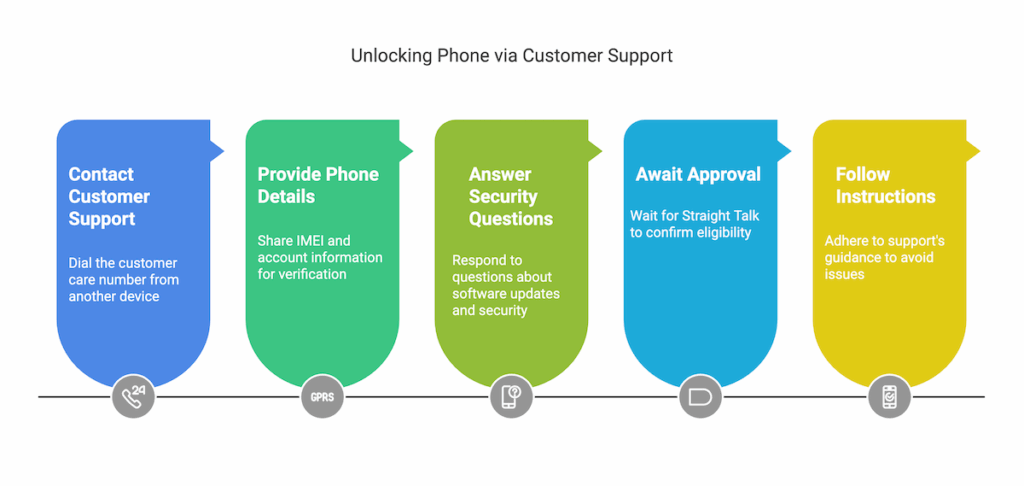
Reach out to Straight Talk Customer Support for a simple way to unlock your phone. Dial their customer care number (1-877-430-2355) from another device to prevent accidental emergency calls through the emergency dialer on your locked phone.
Have important details like your phone’s IMEI number and account information ready so the agent can verify you own it. The rep might also ask about recent software updates or security patches you’ve installed, such as Android OS versions or any facial recognition and lock screen bypass attempts.
Straight Talk typically confirms if devices meet unlocking criteria within two business days after the request. If they approve it, follow support instructions closely—this helps avoid common pitfalls like data loss, bricking devices, or attracting malicious hackers looking for backdoors into tablets and smartphones with weak passcodes or outdated software versions lacking multi-factor authentication features.
Now let’s explore how you can handle things yourself using Method 2: Using Straight Talk’s Online Unlock Portal.
Method 2: Using Straight Talk’s Online Unlock Portal

Straight Talk’s online unlock portal offers a simple way to remove your phone’s restrictions. Visit the Straight Talk website and log in with your account details. Choose the “Unlock Phone” option from your home screen menu, enter your device’s IMEI number, and follow the easy prompts provided on-screen.
This method helps you quickly unlock Android passwords without risking data loss or having to perform a wipe data/factory reset.
Before starting this process, make sure USB debugging is off and security updates are current for smooth results. The steps are clear enough even if you’re not tech-savvy; just keep sensitive data backed up via Google Drive first as an extra precaution against any hiccups.
If issues arise during unlocking, safe mode can help troubleshoot problematic applications that may interfere with settings like face ID or lock screens.
Method 3: Trusted Third-Party Unlocking Services

Third-party unlocking services online can quickly remove screen lock restrictions and carrier blocks on your Straight Talk phone. Many websites provide simple step-by-step instructions to input unlock codes, bypass Android lock screen issues, or easily access recovery mode without data loss prevention troubles.
Before you choose a service, check customer reviews carefully to avoid malware scams or risky software updates that could harm mobile operating systems. Now you’re ready for some extra tips to help unlock your phone smoothly.
Don’t Miss It: The Best Phone Unlocking Services
Tips for a Successful Unlock Process
Before you start, back up your data to an SD card or with a USB cable. Double-check that you’ve turned off security features like Find My Device and removed any screen passwords beforehand.
Ensure your phone meets all conditions
Make sure your Straight Talk phone is active for at least 12 months. The device must not be linked to any reports of theft or loss, and payments should be up-to-date. Check that the software is updated to Android 6.0 or higher; older versions like Android 4.4 and Android 5.0 often cause compatibility issues during unlocking attempts.
Your unlock phone password needs disabling before you start, along with security measures such as find my device, FRP bypass tools, iCloud locks for iPhones or ipads, face ids features, touch id systems on iphone’s home buttons, pins used in notification area access control settings and data backups on SD cards or via USB cable transfers.
Backing up important personal content using cloud services like icloud can prevent data breach concerns if problems occur while removing your screen passwords or resetting camera app preferences during unlocking steps.
Contact customer support for assistance
If you run into trouble unlocking your Straight Talk phone, reach out to customer support for direct help. The team can give clear guidance on password recovery steps or phone troubleshooting without complicated jargon.
Whether you’re facing issues with touchscreen response, notification panel access problems, or confusion about software updates, customer reps are trained to walk you through each step calmly and clearly.
They also offer quick advice on data security concerns related to removing screen passwords and avoiding unsafe jailbreak attempts that could harm your device’s safety.
Don’t Miss It: How to Unlock a Verizon Phone Yourself for Free
Common Issues and Troubleshooting
Unlocking your Straight Talk phone usually goes without trouble, but issues can happen. Understanding common problems can save you from frustration later.
- Computer error messages on Straight Talk’s unlock portal often pop up due to outdated browsers or locked cookies. Update your browser software and clear cookies to fix this issue.
- Sometimes phones don’t respond correctly after unlocking, causing difficulty with touch input or screen freezing. Restart your phone, make sure your software is updated, and try again.
- If your unlocked iPhone can’t make calls beyond the emergency number, activation may have failed during setup. Insert a new SIM card or contact customer service to complete device activation.
- Accidentally activating strong passwords or lock patterns after unlocking can block access again immediately after process completion. Carefully remove screen password settings before beginning the unlocking process.
- Some users experience compatibility issues connecting devices like smartwatches such as Apple Watch or Wear OS watches after unlock completion. Reset Bluetooth connections on the smartphone and smartwatch to pair them freshly once more.
- After unlocking older devices like iPods and Kindle e-readers through third-party services, unexpected malfunctions sometimes occur due to incompatible unlock methods used by uncertified providers online. Check closely for authorized third-party unlocking services well-reviewed by other users online before paying money towards unofficial sources.
With these points settled clearly in mind, you’ll be ready for a smooth transition into final steps for properly using your unlocked Straight Talk phone daily under the next heading of our guide.
Conclusion
Getting your Straight Talk phone unlocked can feel like solving a puzzle. But with the helpful support team, Straight Talk’s online unlock portal, or reliable third-party services, you have easy paths forward.
Make sure to check for software updates before starting to avoid common snags. Your smartphone or iPhone isn’t trapped for life—set it free and enjoy using other networks without fuss!
FAQs
1. Can I unlock my Straight Talk phone if the software updated recently?
Yes, you can still unlock your Straight Talk phone even after the software updated. Just make sure your device meets all unlocking requirements first.
2. Does unlocking affect my iPhone’s warranty with Straight Talk?
Good news—unlocking won’t void your iPhone’s warranty at all. But be careful not to damage it during the process; that’s a whole different ballgame.
3. Will unlocked ereaders from Straight Talk work on other networks?
Actually, most ereaders aren’t tied to cellular carriers like phones are, so unlocking usually isn’t needed here. Double-check with your new network provider just in case.
4. How long does it take for a Straight Talk phone or an iPhone’s SIM lock removal request to go through?
Typically, once you’ve submitted everything correctly and have kept the software updated regularly, it’ll take about two business days tops—so hang tight!


