


So, you’ve got a prepaid phone, and now you’re wondering—can I unlock it? Yes, you can unlock your prepaid phone, and it’s definitely worth considering! Unlocking gives you the freedom to switch carriers, find better deals, and use your phone internationally without extra costs. The process is simpler than you might think—let’s break it down.
How to Check If Your Prepaid Phone Is Eligible for Unlocking
Before you rush to unlock your phone, you need to check if it qualifies. Each carrier has its own rules, but here are some common requirements:
- The phone must be fully paid off – If you got the phone as part of a prepaid plan, you might need to use the service for a certain period before unlocking is allowed.
- No outstanding balances – Any unpaid bills might delay your unlock request.
- The phone must not be reported as lost or stolen – If it’s blacklisted, unlocking won’t help.
- The phone must have been active for a certain time – Some carriers require at least six months of service before unlocking.
If your phone meets these conditions, you’re good to go!
How to Unlock Your Prepaid Phone (Step-by-Step)
Step 1: Check If Your Phone Can Be Unlocked
Before you get too excited, you need to confirm that your phone is eligible for unlocking. Carriers have different rules, but here are the general requirements:
- Your Phone Must Be Paid Off – If you still owe money on your device, most carriers won’t unlock it until it’s fully paid.
- Must Have Been Used for a Set Period – Many carriers require at least 6 months of service before they’ll unlock a prepaid phone.
- Not Reported Lost, Stolen, or Blacklisted – If your phone has been flagged as lost or stolen, unlocking it is impossible—it won’t work on any carrier.
🔹 How to Check If Your Phone Is Blacklisted:
- Go to IMEI.info
- Enter your IMEI number (explained in Step 2)
- If it says “Blacklisted“, you won’t be able to unlock or use it with any network.
💡 Carrier-Specific Unlocking Rules:
- Verizon prepaid phones unlock automatically after 60 days.
- T-Mobile and AT&T require 6 months of active service.
- Cricket Wireless, Metro by T-Mobile, and Boost Mobile require you to contact customer support for unlocking.
Step 2: Find Your IMEI Number
Your IMEI (International Mobile Equipment Identity) number is the key to unlocking your phone. It’s a unique 15-digit code that identifies your device.
🔹 Here’s how to find it:
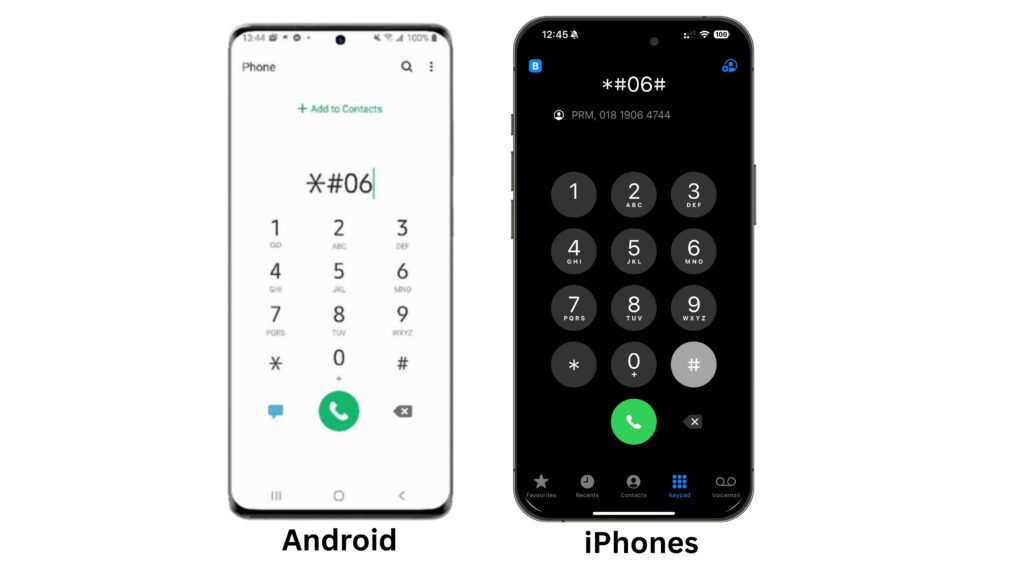
1️⃣ Dial *#06# on your phone – The IMEI number will pop up on your screen.
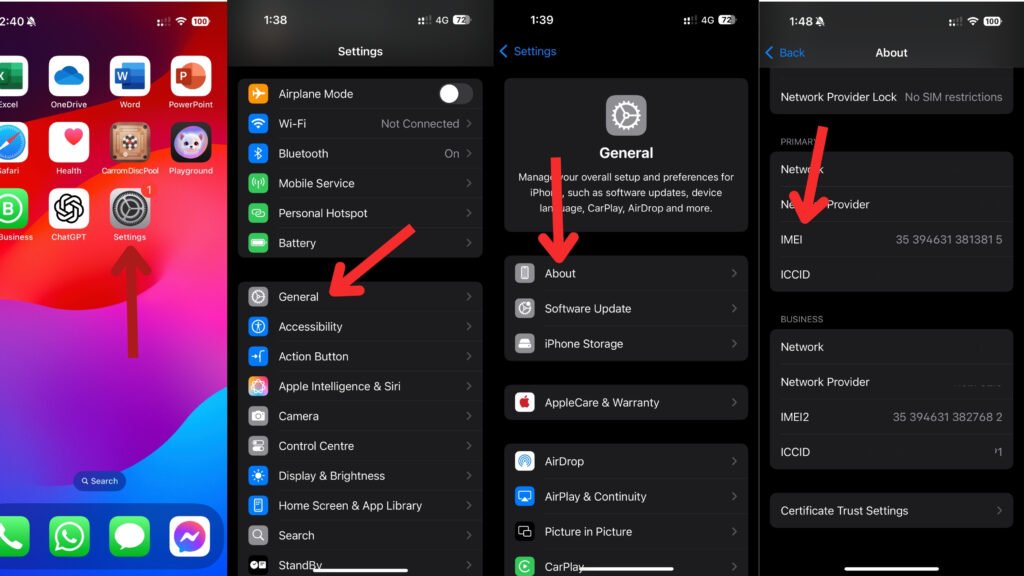
2️⃣ Go to Settings:
iPhone: Settings > General > About
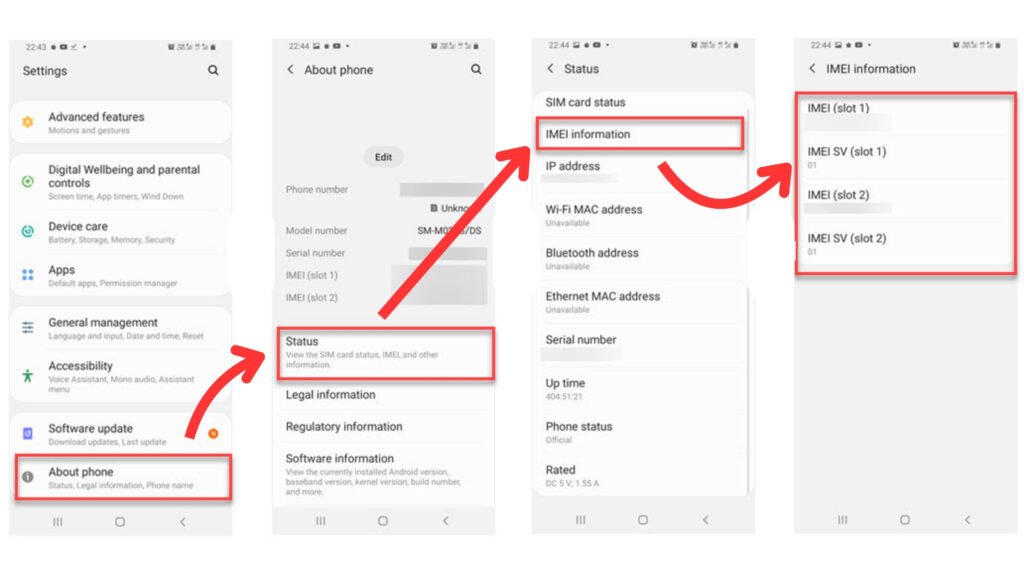
Android: Settings > About Phone > IMEI
3️⃣ Check the original phone box or SIM tray—the IMEI is often printed there.
✏ Write this number down—you’ll need it when requesting an unlock.
Step 3: Request an Unlock from Your Carrier
Now that you have your IMEI, it’s time to ask your carrier to unlock your phone. Each company has its own process.
📞 How to Contact Major U.S. Carriers for Unlocking:
Verizon Wireless: You can contact Verizon customer service at 1-800-922-0204. If you’re calling from a Verizon phone, simply dial 611. For more support options, visit their official website: Verizon Contact.
AT&T: To reach AT&T customer service, dial 1-800-331-0500. AT&T users can also contact support by dialing 611 from their phones. You can find additional help and support on their website: AT&T Contact.
T-Mobile: If you need assistance from T-Mobile, call 1-800-937-8997. If you’re using a T-Mobile phone, just dial 611. More support resources are available on their official page: T-Mobile Contact.
US Mobile: Customers can contact US Mobile by calling +1 (878) 205-0088. Since this is a smaller carrier, there is no direct 611 dialing option. For further inquiries, visit their support page: US Mobile Contact.
Cricket Wireless: To speak with Cricket Wireless customer service, call 1-800-274-2538. Cricket users can dial 611 for direct support. More information is available on their website: Cricket Contact.
Important: Some carriers charge a small unlocking fee if your phone doesn’t meet the eligibility requirements.
Step 4: Enter the Unlock Code (If Required)
If your carrier provides an unlock code, follow these steps to enter it:
1️⃣ Power off your phone.
2️⃣ Remove your old SIM card and insert a new SIM from another carrier.
3️⃣ Turn on the phone—you’ll see a message like “SIM Network Unlock PIN”.
4️⃣ Enter the unlock code provided by your carrier.
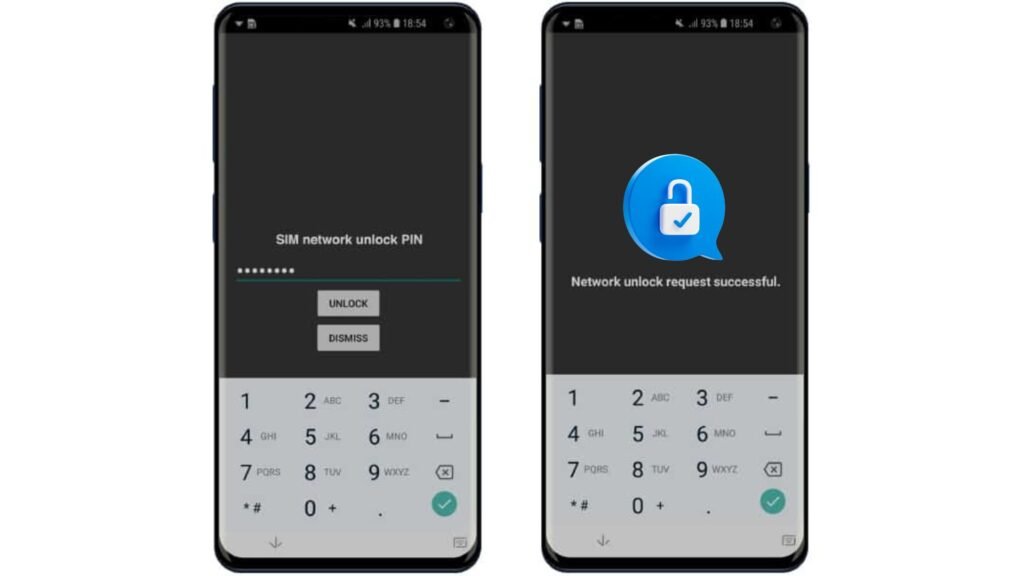
5️⃣ Restart the phone—your device should now be unlocked!
🔹 No unlock code? Some carriers, like Verizon, unlock phones automatically, so you won’t need to enter anything.
Step 5: Test Your Unlocked Phone
Once you’ve entered the unlock code (or your carrier has confirmed the unlock), it’s time to make sure everything works.
- Insert a new SIM card from a different carrier.
- Restart your phone.
- Try making a call, sending a text, or using mobile data.
🎉 If everything works, your phone is now fully unlocked!
Don’t Miss It:
- How to Check If a Phone Is Unlocked Before Buying
- How to Unlock an iPhone for Any Carrier: A Complete Guide
- How Long Does It Take to Unlock a Phone?
Alternative Ways to Unlock Your Phone
If your carrier refuses to unlock your phone or you don’t meet their requirements, you still have options:
1. Use a Third-Party Unlocking Service
If your carrier refuses to unlock your phone, don’t panic—you still have options. Paid unlocking services can remove carrier locks, even if your phone doesn’t meet the requirements. go to The Best Phone Unlocking Services in 2025
Unlocking Services:
- DoctorSIM – Fast and reliable.
- UnlockBase – Works with most phones.
- CellUnlocker – Great for older models.
⚠️ Be Careful! Avoid shady websites that offer “free unlocking”—many are scams. Always read reviews before using a third-party service.
Why Would You Want to Unlock Your Prepaid Phone?
Locked prepaid phones can be frustrating. They limit your options and force you to stick with the same carrier. Here are some solid reasons why unlocking your phone is a smart move:
- Switching Carriers: Maybe you found a better deal with another provider. If your phone is locked, you can’t switch without buying a new device.
- Traveling Internationally: An unlocked phone lets you use a local SIM card instead of paying expensive roaming fees.
- Resale Value: Unlocked phones sell for more money because they work with multiple carriers.
- Avoiding Contracts: Prepaid plans give you freedom, but a locked phone still ties you down. Unlocking it puts the control in your hands.
Now that you know why unlocking makes sense, let’s break down how it all works.
What Does Unlocking a Prepaid Phone Mean?
Carriers lock prepaid phones to ensure you stay with their service. When a phone is locked, it can only use SIM cards from that particular carrier. Unlocking removes this restriction, making the phone compatible with other networks.
However, just because you own the phone doesn’t mean you can unlock it anytime. Most carriers have policies in place that dictate when and how you can unlock your device.
Is It Legal to Unlock a Prepaid Phone?
The short answer? Yes, in most places. In the U.S., for example, the Unlocking Consumer Choice and Wireless Competition Act makes it legal to unlock your phone. But there’s a catch: the phone must meet certain conditions set by the carrier. That means you may need to complete a waiting period or pay off any outstanding balance before they’ll approve the unlock request.
What to Do After Unlocking Your Phone
Once your phone is unlocked, here’s what you should do next:
- Choose a new carrier – Research plans and networks to find the best fit.
- Insert a new SIM card – Make sure it’s compatible with your phone’s network bands.
- Set up APN settings – If your mobile data isn’t working, you may need to update Access Point Name (APN) settings. Your new carrier can provide instructions.
Things to Keep in Mind
- Not all phones work with all carriers – Just because your phone is unlocked doesn’t mean it will work on every network. Make sure the new carrier supports your phone’s bands and technology (GSM or CDMA).
- Unlocking doesn’t remove all restrictions – Some phones might still have software limitations from the original carrier.
- Backup your data – It’s always a good idea to back up your important files before unlocking.
Frequently Asked Questions (FAQs)
Can a prepaid phone be unlocked?
Yes, a prepaid phone can be unlocked, but it depends on your carrier’s policy. Most carriers require you to meet certain conditions, such as using the phone for a specific period (usually 6 to 12 months) or having the account in good standing. Once eligible, you can request an unlock code from your carrier and use your phone with different networks.
What information does a carrier need to unlock a phone?
Carriers typically require details like your phone’s IMEI number, account information, and proof of ownership. Some may also ask for the phone number associated with the device and confirmation that it hasn’t been reported lost, stolen, or involved in fraudulent activity. It’s always best to check your carrier’s specific unlocking requirements.
What is the downside to a prepaid phone?
Prepaid phones are great for affordability and flexibility, but they do have some drawbacks. They often come locked to a single carrier, meaning you can’t easily switch networks. Additionally, they may have limited device choices compared to postpaid plans. Some prepaid plans also lack premium features like international roaming or priority data speeds.
Can I unlock a prepaid T-Mobile phone?
Yes, T-Mobile allows prepaid phone unlocking, but you must meet their eligibility requirements. Typically, your phone must have been active on T-Mobile’s network for at least 365 days or have used $100 or more in refills. Once you meet these conditions, you can request an unlock via the T-Mobile website, app, or customer service.
Can you unlock a phone yourself?
It depends. If your phone is eligible for unlocking through your carrier, they will provide a code or remotely unlock it for free. However, if your carrier refuses or you don’t meet the requirements, third-party unlocking services exist. Just be cautious—some services may be unreliable or even violate carrier policies. Always research before using a third-party service.
Why can’t I unlock my AT&T prepaid phone?
If AT&T denies your unlock request, it could be due to several reasons. The most common one is not meeting their 6-month active service requirement for prepaid phones. Other reasons include outstanding payments, the phone being reported as lost/stolen, or it being associated with fraud. You can check your unlock status on AT&T’s official unlock portal.


