TL;DR — The Honest Quick Answer
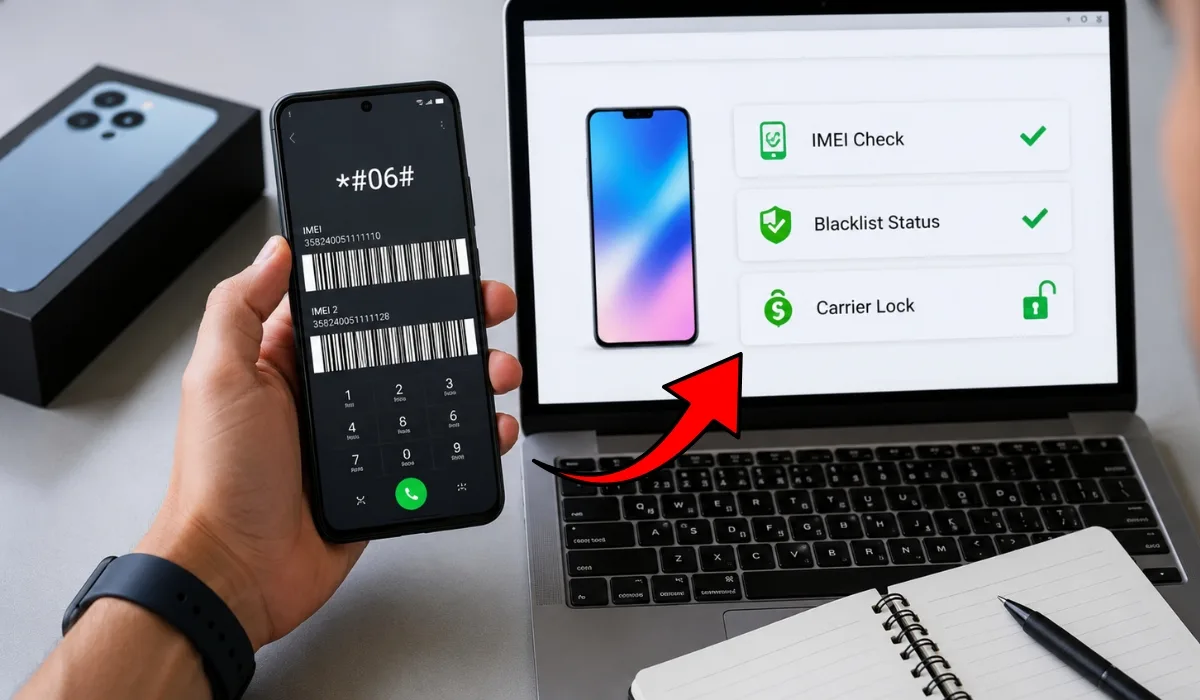
Never buy a pawn shop phone without checking three things first: the IMEI, the blacklist status, and the carrier lock. Dial *#06# on the phone to get its IMEI, then run it through the free CTIA Stolen Phone Checker to see if it was reported lost or stolen. A blacklisted phone cannot connect to any US carrier — it’s only good for Wi-Fi.
Also check for a carrier lock (the phone may only work on AT&T, T-Mobile, or Verizon) and an Activation Lock (iCloud or Google account still attached). Insert your own SIM and open Settings before paying. The whole check takes under 5 minutes and can save you hundreds of dollars.
Pawn shops can be one of the best places to find a cheap phone. You can often pick up an iPhone or Galaxy for 30–50% less than a used marketplace price, hold it in your hand, and walk out with it the same day.
But here’s the honest part most guides skip: pawn shops are also where lost, stolen, and unpaid-financing phones end up. Most shops run basic checks, but they are not required to guarantee a phone will activate on your carrier. If you buy a blacklisted phone, you usually can’t fix it — only the original owner or the carrier can remove a blacklist.
The good news? You can verify everything yourself in about 5 minutes, right at the counter. This guide walks you through every check, step by step, using free tools.
First, Get the IMEI — Here’s How
The IMEI (International Mobile Equipment Identity) is a unique 15-digit serial number that identifies every phone. Think of it like a VIN number on a car. Every check in this guide starts with it.
There are three ways to find it on any phone, even one that’s locked to a carrier:
| Method | How To Do It | Works When… |
|---|---|---|
| Dial code | Open the dialer and type *#06# — the IMEI pops up instantly | Phone powers on (no SIM needed) |
| Settings menu | iPhone: Settings → General → About Android: Settings → About Phone → Status | Phone isn’t screen-locked |
| SIM tray / back | Check the SIM tray, the back of the phone, or the original box label | Phone won’t power on |
The IMEI from *#06# should match the one printed on the SIM tray or box. If they don’t match, the phone may have been tampered with or the box belongs to a different device. Walk away.
Run a Blacklist Check (This Is the Big One)
A blacklisted phone has been reported lost, stolen, or unpaid by its original owner or carrier. Once an IMEI hits the blacklist, US carriers share that data — the phone gets blocked from calls, texts, and mobile data on virtually every network. It becomes a Wi-Fi-only device.
Here are the tools we recommend, in the order you should use them:
CTIA Stolen Phone Checker
- Go to stolenphonechecker.org
- Enter the IMEI and run the check
- Green result = no lost/stolen report on file. Red result = reported — do not buy.
IMEI.info Blacklist Check
Your Carrier’s Own Compatibility Checker
- T-Mobile: BYOD/IMEI check on t-mobile.com, or call 844-839-5057
- AT&T: Device compatibility tool on att.com, or call 855-223-0558
- Verizon: BYOD checker on verizon.com, or call 1-800-VERIZON
No single blacklist checker sees everything, and results can vary between databases. A phone can also be reported after you check — for example, if the original owner stops paying an installment plan. Checking 2–3 sources, ending with your own carrier, gives you the strongest picture possible at the time of purchase.
Check the Carrier Lock Status
A clean IMEI doesn’t mean the phone will work on your carrier. Many phones sold in the US are carrier-locked — the software only accepts SIM cards from the carrier that originally sold it. A locked AT&T phone won’t take your T-Mobile SIM, even if the blacklist check is perfectly clean.
The 2-minute SIM test (do this in the store)
- Bring your own active SIM card (or set up an eSIM-ready line beforehand).
- Insert your SIM into the pawn shop phone.
- Wait 30–60 seconds. If you get signal bars and can place a call, the phone accepts your carrier.
- If you see “SIM Not Supported,” “Network Locked,” or “Invalid SIM” — it’s locked to another carrier.
Check the lock status in Settings (iPhone)
On iPhones running iOS 14 or newer, go to Settings → General → About → Carrier Lock. If it says “No SIM restrictions,” the phone is unlocked. Any other message means it’s locked.
Can a locked phone be unlocked later?
Sometimes — but only if the phone meets the original carrier’s unlock rules, and pawn shop phones often don’t. Here’s how the big three handle it:
| Carrier | Typical Unlock Requirement | Pawn Shop Reality |
|---|---|---|
| AT&T | Device fully paid off; postpaid devices generally eligible after ~60 days of active service | If the original owner still owes payments, AT&T won’t unlock it for you |
| T-Mobile | Device paid off + minimum days of active service (longer for prepaid) | Unlock requests usually must come from the original account holder |
| Verizon | Automatically unlocks 60 days after activation | Most used Verizon phones are already unlocked — but verify with the SIM test anyway |
A phone can pass a blacklist check today and still get blacklisted next month if it’s tied to an unpaid installment plan. That’s why a locked phone from a pawn shop is a bigger risk than most people realize: the lock often signals the device was never paid off. When in doubt, prefer phones that show as factory unlocked or already carrier-unlocked.
Don’t Forget the Activation Lock (iCloud & Google FRP)
This is the check most buyers miss — and it can turn a phone into a paperweight even with a clean IMEI and no carrier lock.
iPhone — Activation Lock: If the previous owner’s Apple ID is still attached (Find My iPhone), you can’t set up or use the phone without their password. On the setup screen, an “iPhone Locked to Owner” message means it’s activation-locked.
Android — Factory Reset Protection (FRP): If the phone was factory-reset without removing the Google account first, it will demand the previous owner’s Google login after reset.
How to test it at the counter
A reputable pawn shop will have already wiped the phone and will happily reset it again while you watch. If a shop refuses to reset a phone before sale, treat that as a serious red flag.
Your Complete In-Store Checklist
Print this or screenshot it. Run every item before money changes hands:
If the phone gets blacklisted after purchase, a receipt showing the IMEI, date, and shop name is your proof of good-faith purchase. Many states require pawn shops to hold and report merchandise, so a paper trail also protects you if the phone is later claimed as stolen property.
What If the Phone Gets Blacklisted After You Buy It?
It happens, and it’s worth knowing your options honestly:
It can be, if you verify the phone yourself. Licensed pawn shops must follow state reporting laws, and many run their own IMEI checks before accepting a phone. But shops are not required to guarantee activation, so the 5-minute check in this guide — IMEI, blacklist, carrier lock, and activation lock — is your real protection.
Dial *#06# to get the IMEI, then enter it at stolenphonechecker.org (the official CTIA tool, free for up to 5 checks a day). For a second opinion, run the same IMEI through a free checker like IMEI.info. Finish with your own carrier’s BYOD compatibility tool for the final word.
Only by the original owner or the carrier that placed the block. If it was flagged for an unpaid bill, settling the account can lift it. If it was reported lost or stolen, the original owner must withdraw the report. As a second-hand buyer, you cannot remove a blacklist yourself — and paid “IMEI cleaning” services are scams or illegal tampering.
Yes. Blacklisting only blocks cellular service — calls, texts, and mobile data. The phone still works on Wi-Fi for apps, browsing, and Wi-Fi calling apps. That’s why blacklisted phones are sometimes sold cheap “for parts or Wi-Fi use” — fine if you know, a rip-off if you don’t.
A blacklisted phone is blocked from all US carriers because it was reported lost, stolen, or unpaid — you generally can’t fix this. A carrier-locked phone works fine, but only with SIM cards from one carrier — this can sometimes be fixed if the phone meets that carrier’s unlock requirements. Always check for both.
Sometimes. Carriers unlock phones that are fully paid off and meet their service-time rules — Verizon even unlocks automatically after 60 days. The catch: unlock requests often must come from the original account holder, and if the previous owner still owes installment payments, the carrier will refuse. That’s why an already-unlocked phone is worth paying a little more for.
It means Activation Lock is on — the previous owner’s Apple ID is still tied to the phone through Find My. Without that owner’s password, the phone cannot be set up or used, even with a clean IMEI. Do not buy an iPhone showing this message unless the shop can complete setup in front of you.
Reputable ones do — many states require pawn shops to record serial numbers and report inventory to local police databases. But those checks catch phones already reported at the time of pawn. A phone can be flagged later (for example, when installment payments stop), which is why your own check on the day of purchase still matters.
This article is for general information only and does not constitute legal or financial advice. Blacklist and carrier lock databases update constantly; a clean result at the time of checking does not guarantee future status. Carrier unlock policies, tools, and phone numbers are accurate as of August 2026 but may change — always confirm details directly with the carrier or shop before purchasing. Unloky may receive compensation from partner phone numbers listed on this page.