

Unlocking your phone for free might sound like a hassle, but it’s easier than most people think. Whether you’re switching carriers, traveling abroad, or selling your device, an unlocked phone gives you the freedom to use any network without restrictions. The good news? Many carriers and services offer free unlocking—if you meet the right conditions.
This guide walks you through the most reliable ways to unlock your phone without spending a dime. From carrier-approved methods to lesser-known options, you’ll learn exactly what works, step by step. No gimmicks, no shady tricks—just legit ways to unlock your phone for free.
Quick Answer: To unlock your phone for free, contact your mobile service provider and request an unlock. They will check if you meet their requirements, such as having no outstanding balance or completing your contract. If eligible, they will provide instructions to unlock your device. 🚀
Can I unlock my phone without paying it off?
Most carriers will not unlock a phone until it is fully paid off. If you’re still making payments, your best options are checking for exceptions with your carrier (some allow early unlocks for military personnel) or using a third-party unlock service. However, third-party unlocks aren’t always free and may not work on all models.
What is the code to unlock all phones?
There is no universal unlock code that works for all phones. Each device has a unique unlock code tied to its IMEI number, which can only be obtained from the carrier or a third-party service. Some older models may have default unlock codes shared online, but modern phones require a proper carrier or IMEI-based unlock.
Can I unlock my phone for free?
Yes, but only if you meet certain conditions. Carriers must unlock phones for free if they are paid off, in good standing, and meet their unlocking policies. Some online IMEI services also offer free unlocks for certain devices, but availability is limited. If free methods don’t work, paid unlocking services may be the only option.
Check If Your Phone Is Locked
Before unlocking your phone, the first step is figuring out whether it’s actually locked. Some phones come factory-unlocked, while others are tied to a specific carrier. If your phone doesn’t accept SIM cards from other networks, it’s locked—meaning you’ll need to go through an unlocking process.
How to Find Out If Your Phone Is Locked
There are two quick ways to check if your phone is locked:
Method 1: Swap the SIM Card
- Power off your phone.
- Remove your current SIM card and insert one from a different carrier.
- Turn your phone back on and try making a call or using mobile data.
- If the call goes through, your phone is already unlocked.
- If you see an error like “SIM Not Supported” or “Network Locked”, your phone is locked to its original carrier.
Method 2: Use the IMEI Number
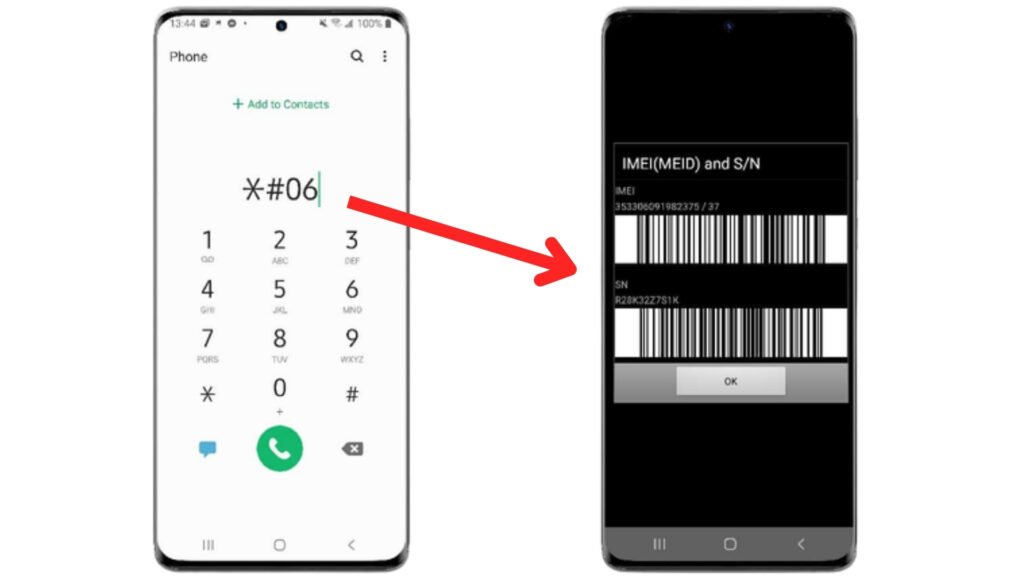
Every phone has a unique IMEI (International Mobile Equipment Identity) number that can tell you if it’s locked.
Find Your IMEI Number
- Dial
*#06#on your phone, and the IMEI number will pop up instantly. - You can also find it in your phone’s Settings under About Phone or on the original box.
Check IMEI Online
Once you have the IMEI number, enter it into a free IMEI checker:
- Many carriers offer IMEI lookup tools on their websites.
- Trusted third-party sites like IMEI.info or Swappa IMEI Checker can also help.
If the IMEI check says your phone is locked, you’ll need to unlock it before switching networks. If it’s unlocked, you’re free to use any carrier’s SIM card right away.
Carrier Unlocking (The Official Free Method)
The easiest and most legitimate way to unlock your phone for free is through your carrier. In the U.S., mobile carriers are required to unlock your device at no cost—as long as you meet their eligibility requirements. If your phone is paid off and in good standing, you can request an unlock in just a few steps.
Who Qualifies for a Free Carrier Unlock?
Each carrier has its own rules, but in general, you need to meet these conditions:
- Your phone is fully paid off (no outstanding balance or installment plan).
- Your account is in good standing (no unpaid bills or contract violations).
- The phone is not reported as lost, stolen, or blacklisted.
- Your phone has been active on the carrier for a certain period (varies by carrier).
If you meet these requirements, your carrier must unlock your phone for free upon request.
How to Request an Unlock from Major Carriers
Here’s how to request a free unlock from the top U.S. carriers:
AT&T
Unlock your phone with AT&T, start by visiting the AT&T Device Unlock Portal and entering your phone’s IMEI number (which you can find by dialing *#06#). Next, fill out the request form with your details and submit it for review. Shortly after, you’ll receive an email with a confirmation link—make sure to click it within 24 hours to process your request. If your phone is eligible, AT&T will either send you an unlock code (for older devices) or automatically unlock your phone within 48 hours.
T-Mobile
Unlock your phone with T-Mobile, it must have been active for at least 40 days on their network. If it’s fully paid off, you can request an unlock by calling 611 or using the T-Mobile app. Some newer T-Mobile phones unlock automatically once they meet the eligibility criteria. For prepaid devices, you must have used the phone on T-Mobile for at least 365 days before they will unlock it.
Verizon
Verizon automatically unlocks most phones 60 days after purchase, so no manual request is needed in most cases. If your phone is still locked after that period, call Verizon Support at 800-922-0204 to request an unlock. Manual requests are only necessary if there’s an issue, such as a blocked or blacklisted device.
Other Carriers (Sprint, Boost, Metro, etc.)
- Sprint merged with T-Mobile, so follow T-Mobile’s unlock process.
- Metro by T-Mobile requires 180 days of active service before unlocking.
- Boost Mobile unlocks phones after 12 months of usage.
- Check your carrier’s website or call support for specific unlock policies.
Using Online IMEI Unlock Services (Some Free Options Available)
If your carrier won’t unlock your phone, IMEI unlock services are another option. These services use your phone’s IMEI number to remove carrier restrictions remotely. While most of them charge a fee, a few offer free unlocks for certain devices.

Be Careful: Not All IMEI Unlock Services Are Legit
There are many websites claiming to unlock phones for free, but some are scams. Before using any IMEI unlock service, check for:
- Customer Reviews – Search for feedback on Trustpilot, Reddit, or forums.
- No Upfront Payment for a “Check” – Scammers often ask for money after claiming your phone is “eligible.”
- A Clear Refund Policy – Legitimate services will issue refunds if the unlock fails.
- Secure Website (HTTPS) – Avoid sites without a secure connection.
- No Software Downloads Required – Unlocking should be done remotely using your IMEI.
Legit Websites That Offer Free IMEI Unlocks
While most IMEI unlock services charge a fee, some offer free unlocks for select devices:
UnlockRiver – Occasionally offers free unlocks for older models.
FreeUnlocks – Provides a free unlock if you complete a sponsored offer.
These websites aren’t guaranteed to work for all phones, but they’re safer options than random sites found online. If you don’t qualify for a free unlock, you may need to use a paid service or try the official carrier unlock method first.
Try Unlocking Through Software or Apps
If traditional unlocking methods don’t work, you might consider using software-based unlocking tools. These programs claim to bypass carrier locks and allow you to use any SIM card, but they come with significant risks and limitations.

Legitimate Unlocking Apps & Software
While carrier unlocking is the safest method, a few software solutions exist that may help unlock specific devices:
DC-Unlocker – Primarily for unlocking modems, routers, and some older Android phones.
SamKey – A paid software that unlocks certain Samsung models.
FuriousGold – A professional unlock tool used by repair shops (not always free).
MTK Client – Works with MediaTek-powered phones but requires technical knowledge.
Most of these tools require a PC connection and some technical skills to unlock your phone successfully.
How Software Unlocking Works
Software unlocking requires downloading and installing an unlocking tool, usually on a Windows PC. Connect your phone to the computer using a USB cable with debugging mode enabled, then run the software. Some tools generate an unlock code, while others modify the firmware. Follow the on-screen instructions, and if successful, your phone will restart unlocked.
Insert a New SIM Card & Confirm Unlock
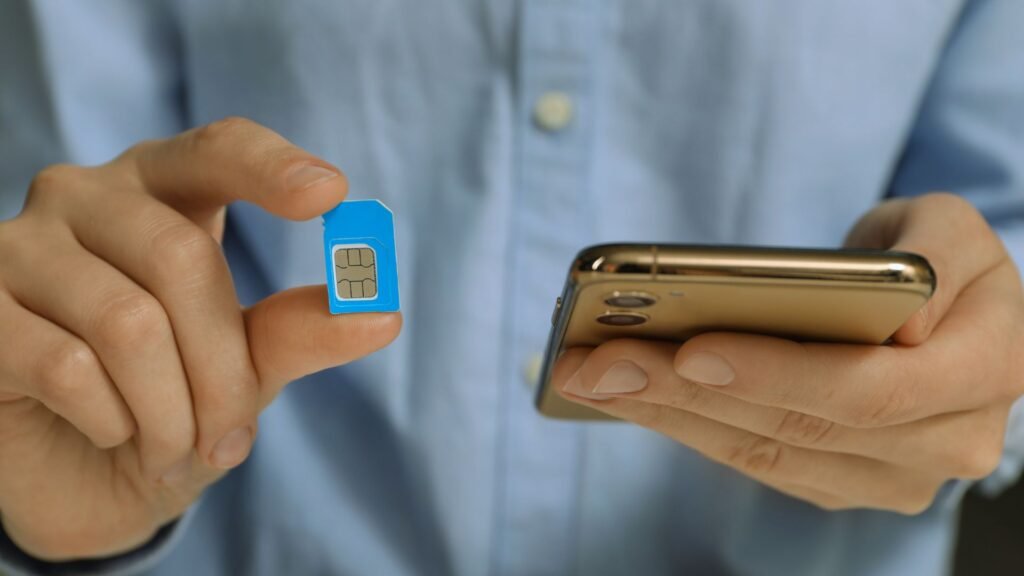
Once your phone has been unlocked—whether by your carrier, an online service, or software—you’ll need to insert a new SIM card to confirm that the unlock was successful. Follow these steps to test and activate your device on a different network.
To insert a new SIM card, start by powering off your phone to prevent errors. Next, remove the SIM tray using a SIM ejector tool (or a paperclip) by pressing into the small hole next to the tray. On iPhones, the SIM tray is on the right side, while on most Android phones, it’s either on the side or under the back cover for older models.
Once the tray is out, insert the new carrier’s SIM card in the correct orientation and carefully slide the tray back into the phone. Turn your phone back on and wait for it to recognize the new SIM—you should see the carrier name change in the status bar. Finally, check for network connectivity by making a call, sending a text, or using mobile data. If everything works fine, your phone is successfully unlocked!
Don’t Miss It:
- How to Easily Unlock your Phone with a Third-Party Service
- Carrier Unlock vs. Jailbreaking: What’s the Difference?
- How to Unlock Your Phone for International Travel
Frequently Asked Questions (FAQs)
Can I unlock a blacklisted phone for free?
No, blacklisted phones (reported as lost, stolen, or involved in fraud) cannot be unlocked through official methods. Carriers refuse to unlock them, and they won’t work on most networks, even if unlocked. Some third-party services claim to remove blacklist status, but these are often unreliable and expensive. If your phone was wrongly blacklisted, contact your carrier to dispute it.
How long does carrier unlocking take?
The time frame depends on the carrier. AT&T and T-Mobile typically process unlock requests within 48 hours, while some smaller carriers may take up to five business days. Verizon automatically unlocks most devices 60 days after activation, so no request is needed. If your request is delayed, contacting customer support can sometimes speed up the process.
Will unlocking my phone erase my data?
No, unlocking your phone does not erase any data. Carrier unlocking is done remotely or through an unlock code, which doesn’t affect storage, apps, or personal files. However, if you use software unlocking methods, a factory reset may be required, which would erase all data. It’s always a good idea to back up your phone before attempting any unlocking process.
Can I unlock a phone that’s still under contract?
It depends on the carrier. Most carriers will not unlock a phone until it is fully paid off or the contract is completed. Some prepaid phones also require a minimum activation period before they qualify for unlocking. If your contract is still active, your options include paying off the remaining balance or using a third-party unlock service (which may not always be free).


