

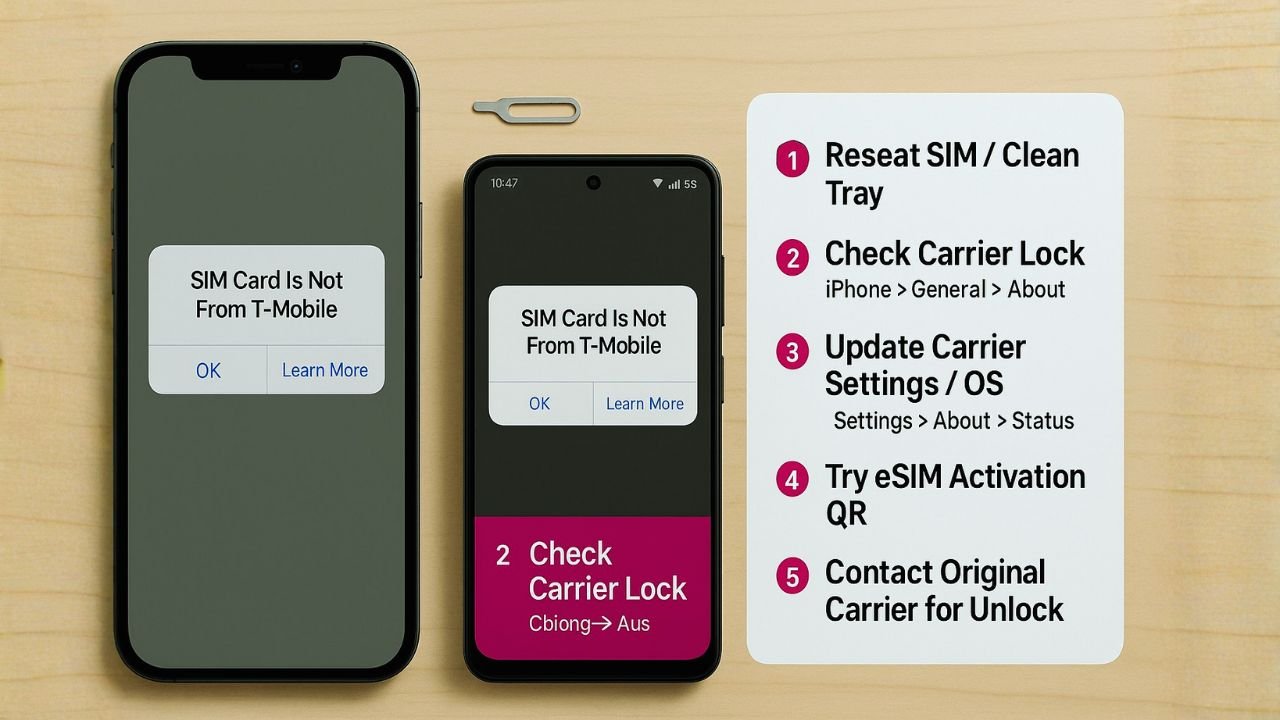
If your phone says “SIM card is not from T-Mobile,” “Network locked,” “SIM not supported,” or “Invalid SIM,” your device and SIM don’t match. Either the phone is locked to another carrier, the SIM/eSIM was set up wrong, or there’s a simple setup issue like an outdated carrier settings file. The good news: most cases can be fixed at home by confirming your lock status, updating settings, and completing T-Mobile’s official unlock steps when needed. This guide walks you through everything—clearly and legally—so you can get back to calls, texts, and data without hassle.
Why You See “SIM Card Is Not From T-Mobile”
Modern phones validate the SIM or eSIM against the carrier the phone is locked to. If they don’t match, the device blocks service. Four common triggers cause the T-Mobile error:
- The phone is carrier-locked to another network.
If an iPhone is locked to AT&T or a Samsung is locked to Verizon, a T-Mobile SIM won’t work until the original carrier unlocks it. - The eSIM/SIM profile is misconfigured.
Wrong plan, wrong line, or a partially activated eSIM can trigger “SIM not supported” even on an unlocked device. - Out-of-date carrier settings or software.
Phones cache network settings. Outdated carrier bundles or system software can misread a fresh T-Mobile SIM. - Account or IMEI issues.
If the IMEI isn’t recognized, is blacklisted (lost/stolen), or the account has a provisioning block, service fails at the network level.
Understanding which bucket you’re in makes the fix fast and clean.
📖 Also Read: How to Fix “SIM card is not from Verizon Wireless”
Step-By-Step Fixes (Do These In Order)
1) Confirm If Your Phone Is Locked
On iPhone:
Go to Settings > General > About and scroll to Carrier Lock.
- If it shows No SIM restrictions, your iPhone is unlocked.
- If it shows a carrier name or “SIM locked,” it’s locked.
On Android (Samsung/Pixel and others):
- Insert a known-working non-T-Mobile SIM (borrow one from a friend).
- If you see an unlock prompt or “Network locked,” the device is locked.
- Some Android phones include Settings > Connections > Mobile Networks > Network Operators: if you can’t search/select other carriers, it’s often locked.
- Samsung devices that display “Network Locked SIM card inserted” or “SIM not supported” are typically carrier-locked.
What this tells you:
- Unlocked: your error likely comes from setup, eSIM/SIM activation, or account provisioning.
- Locked: you must unlock the device through the original carrier (not T-Mobile) unless the device is already a T-Mobile-locked phone you own and meet T-Mobile’s unlock policy for.
2) Rule Out Easy Setup Issues (Works for Unlocked or T-Mobile-Locked Devices)
Power cycle + reseat the SIM
Turn the phone off. Remove the SIM with the eject pin, check for dust or damage, reinsert firmly, and restart.
Try another SIM slot/eSIM profile
Dual-SIM phones can mix profiles or assign data to the wrong line. Delete any stale eSIMs and keep only the line you want active for testing.
Update iOS/Android & carrier settings
- iPhone: Settings > General > Software Update, then connect to Wi-Fi and look for a Carrier Settings Update prompt when you insert the SIM.
- Android: Settings > Software update, then open Settings > Connections > Mobile networks and toggle Automatic network selection off/on.
Reset Network Settings
- iPhone: Settings > General > Transfer or Reset iPhone > Reset > Reset Network Settings (this removes Wi-Fi passwords and APN customizations).
- Android: Settings > General management/System > Reset > Reset network settings (wording varies by brand).
If the phone is truly unlocked and the SIM is good, you should register on T-Mobile’s network after these resets.
3) If Your Phone Is Locked—Unlock It The Right Way
A. Locked to another carrier (AT&T, Verizon, etc.)
You must request the unlock from the original carrier, not T-Mobile. Once approved, the phone will accept a T-Mobile SIM.
- iPhone: After the carrier completes the unlock in Apple’s database, insert your T-Mobile SIM and connect to Wi-Fi; activation happens over the air.
- Android: Some models require entering an 8- or 16-digit Network Unlock Code or using the device’s Device Unlock client to finalize.
B. Locked to T-Mobile
If you bought the phone from T-Mobile and it shows the error with another carrier’s SIM, complete T-Mobile’s unlock steps:
- iPhone: T-Mobile lifts the lock server-side when eligibility is met (account in good standing, device fully paid, active for the required period). Insert a non-T-Mobile SIM and activate over Wi-Fi.
- Android: Many T-Mobile Android phones include the Device Unlock feature (often in Settings > Connections > More connection settings or via a Device Unlock app on older models). Tap Permanent Unlock when eligible.
Tip: Unlock approvals are instant on some lines but may require a restart or Wi-Fi activation. If the phone still rejects your SIM after approval, see the re-activation steps below.
📖 Also Read: How to Unlock a Total Wireless Phone (iPhone, Android)
4) Fix eSIM-Specific Problems (iPhone & Android)
Delete and reinstall the eSIM
- iPhone: Settings > Cellular > [Your eSIM] > Remove eSIM, then Add eSIM. Use T-Mobile QR code or eSIM Quick Transfer if moving from another iPhone line.
- Android (Pixel/Samsung): Settings > Network & internet/Connections > SIMs/eSIM > Remove, then Add eSIM with T-Mobile QR or activation code.
Pair the right IMEI
eSIMs bind to a specific IMEI (physical phone identifier). If T-Mobile has the wrong IMEI on file, your eSIM may not provision. Confirm the primary IMEI under Settings > About matches what T-Mobile has on your line.
Turn on Wi-Fi calling after activation
Once the line is active, enabling Wi-Fi Calling can help finalize provisioning and improve coverage during the first few minutes.
5) Fix Physical SIM & APN Issues (Uncommon, but Easy to Check)
Inspect the SIM
Cracks, worn contacts, or a bent tray can cause intermittent reads. If in doubt, ask T-Mobile for a replacement SIM and re-activate your line.
Reset the APN to default
- iPhone: APN loads from carrier settings; if you used a manual APN before, erase it by Reset Network Settings.
- Android: Settings > Mobile networks > Access Point Names. Tap ⋮ > Reset to default and avoid third-party APN profiles while testing.
6) Re-Activate After Unlock or Line Changes
After a carrier unlock or a line swap, complete a clean activation:
- Insert the T-Mobile SIM or install the eSIM.
- Connect to strong Wi-Fi and restart the phone.
- On iPhone, wait for the activation banner to finish; on Android, watch for LTE/5G and place a test call.
- If data works but calls fail, toggle VoLTE (Android) or Wi-Fi Calling (both platforms) off and on, then restart once more.
📖 Also Read: How to Get a Vodafone Network Unlock Code for Free?
iPhone-Specific Fixes
Check Carrier Lock and Activation Status
Under Settings > General > About, confirm Carrier Lock and Network. If it shows your T-Mobile plan and No SIM restrictions, you’re good; any error now is setup-related.
Force a Carrier Settings Refresh
Insert the T-Mobile SIM, connect to Wi-Fi for 5 minutes, and open Settings. If prompted, tap Update for carrier settings. If not prompted, still leave it connected—iPhones silently refresh in the background.
Reactivate With iTunes/Finder (macOS/Windows)
If activation stalls, connect the iPhone to a Mac/PC and open Finder (macOS) or iTunes (Windows). It often forces Apple’s activation server to re-query your carrier lock status after an unlock.
eSIM “Transfer or Erase” Clean-Up
If you migrated from another carrier, you may have a dormant eSIM profile. Remove old profiles and keep only the active T-Mobile line to avoid routing confusion.
Android-Specific Fixes (Samsung, Pixel, OnePlus, etc.)
Use the Built-In Unlock Client Where Available
Many T-Mobile Android devices expose Device Unlock: open Settings, search “unlock”, and look for Permanent Unlock. If your account is eligible (device paid off; service time met), the phone will unlock over the air after Wi-Fi verification and a reboot.
Clear Carrier Services / SIM Toolkit Cache
On some Android builds, cached telephony data blocks fresh provisioning.
- Go to Settings > Apps > Show system apps.
- Find Carrier Services, SIM Toolkit, and Phone Services (names vary).
- Force stop and Clear cache, then restart and reinsert the SIM.
Toggle Preferred Network Type
Switch from 5G/LTE/Auto to LTE only, restart, confirm calls/data, then switch back to 5G Auto. This repopulates registration on the T-Mobile core network and can clear a stale attach state.
How T-Mobile Unlocking Actually Works (What to Expect)
- Eligibility matters. Phones bought on installments usually unlock only after payoff and a minimum active period (for many postpaid lines, 40–60 days is common, but plans and promos can vary).
- Server-side for iPhone. Apple’s servers hold the lock flag; once T-Mobile or the original carrier marks it unlocked, your iPhone updates over Wi-Fi or when you connect to a computer.
- Client-side for many Androids. The device may require a “Permanent Unlock” action or a one-time code.
- MVNOs on T-Mobile (e.g., Metro by T-Mobile, Mint, Ultra, Google Fi). MVNO unlock timelines can differ. If your phone came from an MVNO store, request the unlock from that provider, not T-Mobile corporate.
If you recently paid off a T-Mobile phone or hit the unlock day, but the device still says “SIM card is not from T-Mobile,” give it a fresh activation (Wi-Fi + reboot) or run the Android Permanent Unlock again.
When It is Not an Unlock Problem
If you’re certain the phone is unlocked and your T-Mobile account is in good standing, consider these less-obvious causes:
- IMEI mismatch on the line. If you changed phones, T-Mobile may still have your old IMEI tied to the line. Ask support to update the IMEI to match Settings > About.
- Region-locked or enterprise-locked devices. Some imported phones are region-locked until you place a certain number of local calls on the original carrier. Corporate/MDM-managed devices can restrict SIMs entirely.
- Blacklisted IMEI (lost/stolen). Any U.S. carrier will refuse activation. You can check IMEI status through reputable IMEI checkers or with support.
- Damaged SIM tray or reader. A bent tray, worn contacts, or liquid damage can cause constant “invalid SIM.” A new tray is inexpensive; a reader repair is more involved.
Safe, Legal, And Effective: What Not To Do
- Don’t use third-party “unlocker” apps or shady codes. They can brick your phone, compromise your data, or get you banned from network features.
- Don’t flash unofficial modems to bypass locks. Baseband tampering can permanently disable cellular radios or violate local law.
- Don’t buy “already unlocked” phones without verifying IMEI. Always confirm the Carrier Lock field (iPhone) or test with another SIM (Android) before you hand over money.
The official unlock path is safer, permanent, and keeps features like Wi-Fi Calling, VoLTE, 5G SA/NSA, and Visual Voicemail working the way they should.
Quick Decision Tree
- Phone shows locked?
→ Request unlock from the original carrier (or T-Mobile if it’s a T-Mobile-branded device you own). - Phone is unlocked but error persists?
→ Reseat SIM/eSIM, update carrier settings, reset network settings, and re-activate on Wi-Fi. - Using eSIM?
→ Remove old profiles, install fresh T-Mobile eSIM tied to the correct IMEI, then restart. - Still stuck?
→ Ask support to verify IMEI on your line, check for blocks or blacklisting, and provision the correct features.
FAQs
What does “SIM card is not from T-Mobile” actually mean?
Your phone is rejecting the SIM/eSIM because it’s locked to a different carrier, the SIM profile is wrong, or the line isn’t provisioned correctly.
Can T-Mobile unlock a phone locked by AT&T or Verizon?
No. Only the original carrier can approve the unlock. After that, your T-Mobile SIM will work.
How long does unlocking take once I’m eligible?
iPhone unlocks are usually instant once the carrier submits it; you may need a Wi-Fi activation or a quick iTunes/Finder connect. Android often needs a Permanent Unlock tap and a reboot.
Will unlocking delete my data?
No. Carrier unlocking doesn’t erase data. A network reset will clear Wi-Fi and APN settings, but not photos, apps, or messages.
Do T-Mobile MVNO phones follow the same rules?
Timelines differ by MVNO. If your phone was sold by Metro, Mint, or another brand on T-Mobile’s network, start the unlock request with that provider.
What if my phone is unlocked but still won’t register on T-Mobile?
Confirm IMEI pairing on your account, reinstall eSIM or swap to a fresh physical SIM, and make sure the device supports T-Mobile’s LTE/5G bands in your region.
iPhone & Android Band Compatibility (A Quick Note)
Even with a perfect unlock and a valid SIM, a phone missing T-Mobile’s key bands (notably LTE Band 2/4/12/66 and 5G n41/n71/n258 where applicable) may show service gaps. Imported models sometimes lack the exact U.S. band mix. If calls/texts work but data is weak, check the model number’s band support and consider enabling LTE only temporarily to stabilize until you reach a 5G area your phone supports.
Troubleshooting Checklist
- Phone unlocked? Verified in Carrier Lock (iPhone) or by testing another SIM (Android).
- SIM/eSIM active? Reinstalled, tied to the correct IMEI, and restarted on Wi-Fi.
- Carrier settings updated? iOS prompt accepted; Android caches cleared.
- Network settings reset? Yes, and APN back to defaults.
- Account clean? No billing holds; IMEI updated; device not blacklisted.
- Hardware OK? SIM tray intact; no liquid damage; antennas working.
Work through those in order. In most cases, the error disappears before you reach the last two.
The Final Thoughts
“SIM card is not from T-Mobile” doesn’t mean your phone is broken. It’s the device’s way of saying “this line and lock status don’t match.” Once you confirm the lock state, reinstall SIM/eSIM the right way, and—if required—complete a proper, carrier-approved unlock, your iPhone or Android should register on T-Mobile just fine. Stick to official paths, keep software updated, and verify IMEI and provisioning with support when in doubt. That approach keeps advanced features working and avoids costly mistakes.


