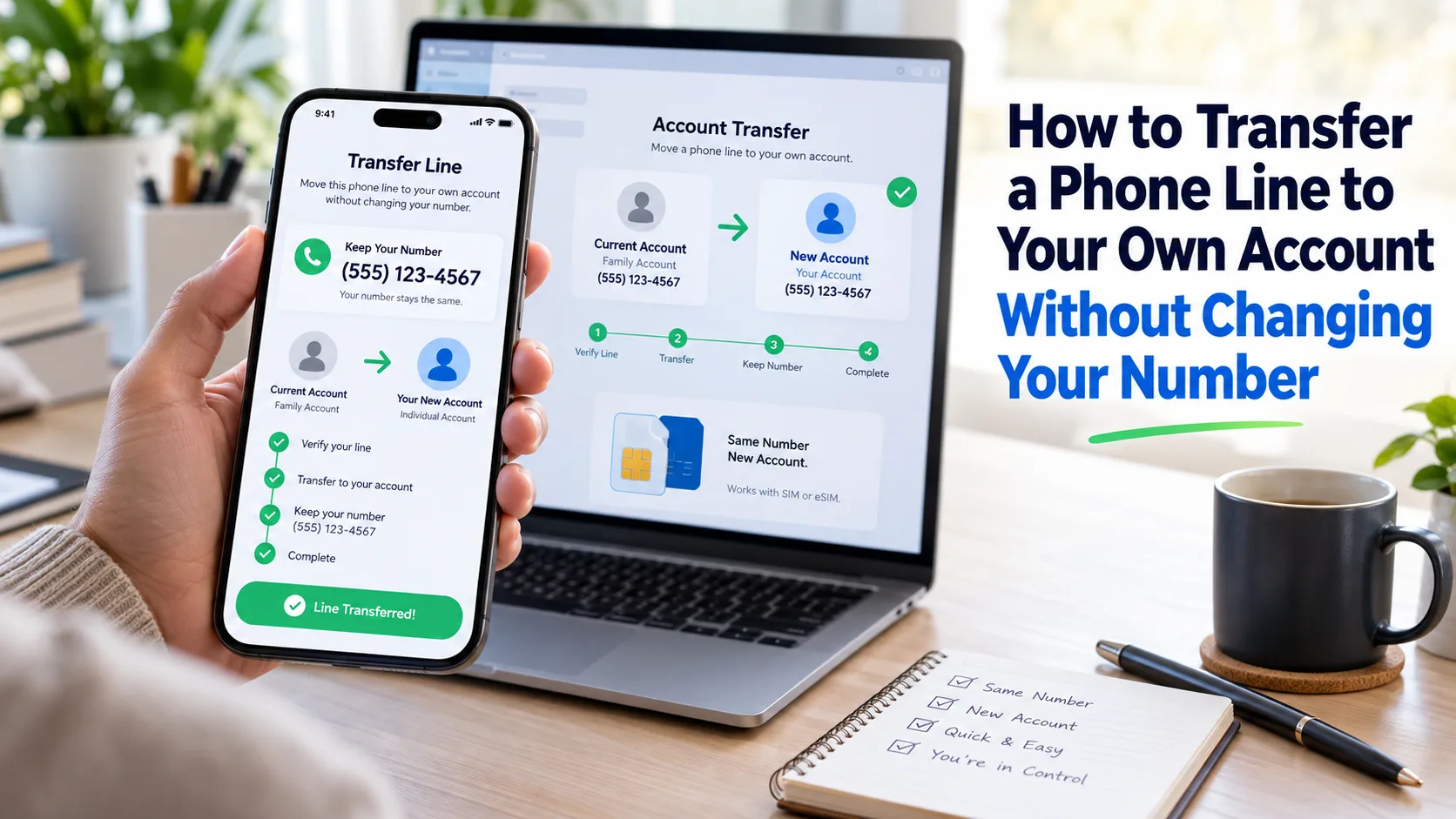
You can usually move your phone line into your own name and keep the same number. Ask your carrier for an ownership transfer, and keep the line active until it finishes.
Key Takeaways
Quick Answer
To transfer a phone line to your own account without changing your number, have the current account owner authorize a transfer of billing responsibility. Then complete the carrier’s identity, credit, plan, and payment requirements. Accept the request before it expires. If you’re switching carriers, request a number port instead.
Understand Which Type of Transfer You Need
Your phone number, mobile account, and physical phone are connected, but they are different things. Moving one does not always move the others.
If you want to leave a family plan while staying with the same carrier, request an ownership transfer. The carrier moves the existing line to a separate account, where you become responsible for its bill.
Carriers use names such as transfer of billing responsibility, change of responsibility, transfer of service, or assumption of liability. Explain what you want even if you do not know the carrier’s exact term.
If you want to move to another carrier, request number porting. That process moves your number between providers. It requires different account details and security checks.
| Your goal | Process to request | Main point to confirm |
|---|---|---|
| Leave a family plan and stay with your carrier | Ownership transfer | Who authorizes and accepts it |
| Move your number to another carrier | Number porting | Account details and the required transfer PIN |
| Use a different phone on your existing line | Device or SIM change | Device compatibility and activation |
| Pay your share of someone else’s bill | Payment arrangement | Paying alone does not transfer ownership |
Adding your credit card, changing a billing address, or becoming an authorized user is not the same as completing an ownership transfer. Ask the carrier to confirm who will be financially responsible afterward.
What to Prepare Before You Start
Get the exact phone number you want to move, the current account owner’s name, and a working email address for your new account. Have your own identification, billing address, and payment method ready.
Ask support which details the current owner must provide. An account number and billing ZIP code are common transfer details, especially when switching providers. However, an internal ownership transfer may start through the owner’s signed-in account or a verified support call.
An account PIN and a number transfer PIN serve different purposes. Do not assume a port-out PIN is required to move a line between accounts at the same carrier. Follow the instructions for your specific transaction.
Let the current owner sign in and verify their own account. You do not need to take over their password or have access to every other family member’s line.
Before calling, write down any device balance, monthly phone credit, insurance charge, and linked smartwatch or tablet line. Ask the owner to share only the bill details needed to review your line.
Save important voicemail messages too. Keeping your number does not guarantee that stored carrier voicemail will survive an account transfer. AT&T specifically warns that these messages are lost when the transfer is complete.
How to Transfer a Phone Line to Your Own Account
Confirm That the Line and Account Qualify
Ask the carrier to check the line’s age, account status, account type, and any transfer restrictions. Do this before opening a new account or paying a device balance.
Eligibility rules differ by carrier. A waiting period for an ownership transfer is not automatically the waiting period for unlocking a phone or porting a number.
If the line is suspended or the account has overdue charges, ask which issue must be resolved for this transfer. Get a specific explanation instead of assuming every type of transfer follows the same rules.
Have the Current Owner Authorize the Move
For a routine ownership transfer, the current owner or another carrier-approved account representative must authorize the request. Using the phone every day does not replace that approval.
You can explain your request this way:
“I want to move only my existing phone line to a separate account in my name, stay with this carrier, and keep my number. What must the current account owner do?”
Read the full number back to support. Make clear whether a linked watch line should move too.
Review Phone Payments and Promotional Credits
Ask whether the phone is paid off and whether a device payment agreement can move with your line. If financing can transfer, find out what approval you need to take it over.
Also ask whether monthly promotional credits will continue. Treat the phone balance and its discount as two separate questions.
A useful request is: “Please confirm the remaining device balance, who will owe it after the transfer, and whether each monthly credit will continue on my chosen plan.”
Apply for the Receiving Account
Provide your own legal name, address, contact information, and any identification the carrier requires through its official process.
The receiving account may need a credit review, deposit, or advance payment. Ask what applies before submitting the application. For example, AT&T requires a satisfactory credit evaluation and may require an advance payment.
Ask about minimum age requirements as well. If you cannot open the account yourself, discuss an eligible adult account owner or another available service option with the carrier.
Choose a Plan Based on the Full Cost
Compare the new plan’s total price with what you currently pay toward the family bill. Your share of a group plan may be lower than the price of a separate account.
Request a quote that includes service, phone installments, taxes, fees, protection, and any optional features. Ask which discounts require AutoPay or another step after enrollment.
Check the features you use most, such as hotspot data or international calling. A lower advertised price means little if you need to add those features back.
Accept the Transfer Before the Deadline
Watch your email and text messages for the carrier’s invitation. Confirm the number, selected plan, payment terms, and any device financing before accepting.
Use your own email address, especially if you are leaving a shared account. Check spam folders if the invitation does not arrive.
The owner starting the request is only one part of the process. Ask for the acceptance deadline and a confirmation when the carrier marks the transfer complete.
Keep the Existing Line Active
Do not cancel the line to “release” your number. Ask the carrier to move the active line through its transfer process.
Tell the current owner to leave it in place until completion is confirmed. An ownership transfer is different from canceling service and opening an unrelated line.
If you are porting to another provider, keeping service active is especially important. Verizon says disconnecting first can require reactivating the number before the new carrier can move it.
Check the Result and Set Up Your Account
Sign in to your own carrier account and confirm that your existing number appears there. Verify your account role and the billing responsibility, not just the displayed phone number.
Turn off Wi-Fi briefly and test a call, text, and mobile data. If something fails, ask support to check the transfer and activation status.
Set your account PIN, recovery email, and payment preferences. Keep the confirmation and quoted costs so you can compare them with your first bill.
Current Transfer Processes for Major U.S. Carriers
These steps focus on consumer mobile service. Business accounts, prepaid lines, and transfers between service types may need a different process.
AT&T: Transfer of Billing Responsibility
Start at AT&T’s transfer page. The current owner initiates the request, and the receiving person completes the acceptance process.
AT&T’s online transfer portal lists a requirement that the account be active for at least 60 days. Its support page also says the account must be active, have no past-due balance, and have Wireless Account Lock turned off. The standard process described there excludes AT&T PREPAID accounts.
Check financing directly with AT&T. Its support guide allows device installments to be paid off or transferred, while the portal says applicable device installments must be paid off. Ask which instruction applies to your line. Accessory installments must be paid off under the support guide.
The recipient follows the invitation and verification steps, then accepts the required service and applicable installment terms.
Verizon: Transfer Your Service
Use the transfer process linked from Verizon’s transfer support page in My Verizon. The sending account’s Owner or Manager starts the request, and the receiving account accepts it.
Verizon says personal lines must be active for 30 days before being transferred out to another Verizon account. The receiving account must complete a personal transfer within 15 days of receiving the email.
The recipient must meet the age requirement, pass a soft credit check, and qualify to assume any device payment agreement. Verizon says this credit check does not affect the credit score. A security deposit may still be required.
Ask Verizon whether your device payment agreement qualifies to transfer or needs another arrangement.
T-Mobile: Change of Responsibility
Contact T-Mobile through its ownership transfer support page. Both the existing owner and the new owner must call to authorize the change.
T-Mobile says the number must have been active on its current account for 90 days. After the current owner completes their part, the receiving person has 30 days to complete theirs.
A credit review and deposit may be required. Equipment Installment Plans have their own transfer rules, including a restriction on transfers during the first 90 days of financing.
Ask support to review any financed phone and its promotional credits alongside the line request. Do not treat approval to move the number as confirmation that all device arrangements have moved.
What Happens to Phone Payments, Discounts, and Bills?
A Phone Balance Needs Its Own Answer
An agreement between family members to split a phone payment is useful, but ask the carrier to confirm who is responsible under the financing contract.
Request the remaining balance in dollars, the number of payments left, and any payoff amount required for your transfer. If you will accept financing, read those terms before completing the move.
Avoid paying off the device simply to speed things up without checking the effect on its offer. For example, T-Mobile’s ownership rules say qualifying purchase-and-trade-in credits can move when the active installment plan and number move together to an eligible plan.
If a balance will stay behind, ask the original owner to confirm the payment arrangement in writing. This helps both of you understand what you agreed to reimburse.
Discounts May Change on Both Accounts
Ask for two price checks: your new bill and the remaining family account’s bill. Removing your line may affect the value of keeping that group plan.
Check each offer separately. Verizon says BYOD promotions do not transfer, while certain device promotions and trade-in credits may transfer under its rules. Job-based discounts may require a new application.
Do not assume keeping your number keeps your old plan price. Write down the confirmed monthly total and any steps required to receive the quoted discount.
The First Bill May Look Different
Check the dates beside each service charge. A first bill can include a partial service period plus a full upcoming month. Verizon’s billing guide explains that monthly plan charges are billed in advance.
For a simple hypothetical example, a $60 monthly plan might show a $20 partial-period charge plus the next $60 month. That is $80 before other charges, even though the regular plan price is $60.
The actual amounts depend on billing dates and carrier rules. Compare the statement with your transfer confirmation, then ask support to explain anything that does not match.
How to Keep Your Number When Switching Carriers
If you want your own account with a different provider, ask that provider to check whether it can accept your number. You may be able to port directly from the shared account without first creating a separate account at the old carrier.
Follow the new provider’s process for permission and account verification. Do not assume having the phone lets you skip the current account’s security requirements.
T-Mobile’s porting guide lists the account number, billing ZIP code, and required transfer PIN among the details needed. It also warns against canceling the old account before completion.
Keeping your number does not prove your handset can work on the new network. Review your phone’s compatibility and, if needed, the carrier unlocking process before switching.
Ask what will remain on the old account. Verizon warns that connected watch, tablet, or hotspot lines may need separate cancellation after the last phone line ports out.
Can You Transfer a Line Without the Current Owner’s Permission?
For an ordinary transfer from a parent’s, partner’s, or friend’s account, plan to get the required authorization. Knowing the phone’s passcode or paying part of the bill is not proof that you control the carrier account.
If the owner is unavailable, explain the situation to the carrier and ask what account role or documentation can authorize the request. Avoid opening a new line with a new number while assuming the old number will move later.
If the transfer involves abuse, contact the carrier privately and ask for its confidential line-separation process. Verizon offers specially trained representatives for these requests. Supporting documentation may be needed, and keeping the handset can still involve device payments.
Common Transfer Problems and What to Do
The Invitation Never Arrived
Ask the current owner to check the recipient address used in the request. Check spam folders and text messages. Have support confirm whether an invitation was sent, remains valid, or needs to be replaced.
The Request Is Pending
Ask which step is unfinished: authorization, identity verification, credit review, plan selection, or acceptance. Request a case number and the next action. Keep the line active while the carrier checks its status.
The New Bill Is Higher Than Expected
Compare the service dates, device charges, and discounts with your quote. Separate one-time or partial-period charges from the ongoing monthly price. Ask support to check missing credits against the specific offer attached to your line.
Calls Work, but the Old Owner Still Controls the Account
Ask the carrier to verify the account owner and billing responsibility. Working service alone does not confirm a completed ownership transfer. You may still be using the line under its original account.
Two Examples of Keeping Your Number
Leaving a Parent’s Family Plan
Imagine Maya has used the same number for years on her father’s account. She wants to pay her own bill and stay with the carrier.
They ask for an ownership transfer of her line only. Before authorizing it, they request separate price quotes for Maya and the remaining family plan. Maya reviews her plan, completes the required checks, and accepts the invitation.
She verifies her account role and billing responsibility after completion. They also confirm who will pay any remaining phone installments.
Moving From a Shared Plan to Another Provider
Imagine Daniel wants a different carrier after moving away from home. He asks the new provider whether it can accept his number directly from the family account.
The current owner helps provide the required authorization and transfer details. Daniel submits the port request and leaves the old line active until completion.
After testing his number, they check the original account for any remaining device charges or linked services. These are hypothetical examples, not guaranteed timelines or prices.
Yes, you can usually keep it through an ownership transfer at the same carrier or a number port to another provider. Tell support which route you want, get the required authorization, and keep the existing line active until the carrier confirms completion.
Ask the carrier before buying either. An ownership transfer changes the account responsible for your line. Whether you need a SIM or eSIM change depends on the carrier and transaction. If switching providers, check handset compatibility and activation requirements separately.
There is no single timeline for every carrier and account. Ask for both the expected completion time and the acceptance deadline. A deadline for accepting an invitation is not a promise that every transfer takes that many days. Follow up if the request stays pending.
Not always. Some eligible device payment agreements can transfer, while others need to be paid off or handled separately. Ask for the rule that applies to your exact line, financing agreement, and receiving account. Confirm what happens to promotional credits before making an early payment.
You can request a transfer of your line only where the carrier supports it. State the exact number to move and ask about linked devices. Review the effect on the remaining account’s pricing before approval, and make sure the confirmation lists only the intended lines.