


Are you stuck with an Android phone that won’t let you switch carriers? About 85% of phones sold in the US come locked to a specific network. This guide will show you how to unlock your Android phone in simple steps.
Read on to free your device today.
Key Takeaways
- About 85% of phones sold in the US come locked to a specific carrier.
- Most carriers like AT&T, Verizon, and T-Mobile process unlock requests in 24-48 hours if your account is in good standing.
- Third-party IMEI unlocking services cost between $15-50 and can unlock your device in 1-3 days.
- The Unlocking Consumer Choice and Wireless Competition Act of 2014 made phone unlocking legal in the United States.
- Carrier unlocking won’t void your hardware warranty, but using third-party software tools might affect it.
Don’t Miss It: The Best Phone Unlocking Services in 2025
What’s the Quickest Way to Unlock an Android Phone?
Now that you know why people unlock their Android phones, let’s talk about the fastest methods. The quickest way to unlock an Android phone depends on what kind of “unlock” you need.
For screen locks, using your fingerprint or face scan takes just seconds. These biometric options work faster than typing a PIN or pattern. For carrier unlocking, calling your service provider directly often gets the fastest results.
Most major carriers like AT&T, Verizon, and T-Mobile can process unlock requests in 24-48 hours if your account is in good standing.
Many users find that online unlock code services offer speed and ease. These third-party services can unlock your Android device from network restrictions in as little as 1-3 hours in some cases.
The process simply requires your phone’s IMEI number and payment. The cost ranges from $5-50 depending on your phone model and carrier. This option works well for phones from carriers with strict unlock policies or for devices purchased second-hand.
Don’t Miss It: Unlocking Android Phone: A Complete Guide
Step-by-Step Guide to Unlocking Android Phone
Unlocking your Android phone is simple with our clear steps. Our guide walks you through each part of the process from checking if your phone is locked to getting it confirmed.
Check if Your Phone is Locked
Your Android phone might already be unlocked without you knowing it. Many newer phones come unlocked from the start. To check, try putting a SIM card from another carrier in your phone.
If calls and data work right away, your phone is unlocked! You can also look in your phone settings. Go to Settings > Connections > Mobile Networks > Network Operators and try to search for networks.
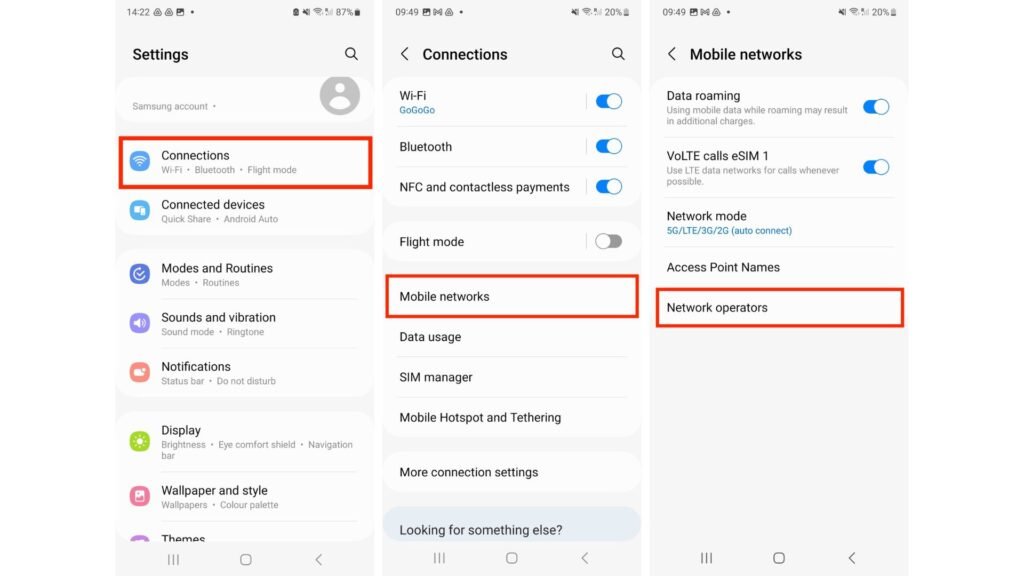
If you see options from other carriers, this is a good sign your device isn’t locked. Some phones also show “Network Lock” or “SIM Lock” status directly in the settings menu under “About Phone” or “Status.”.
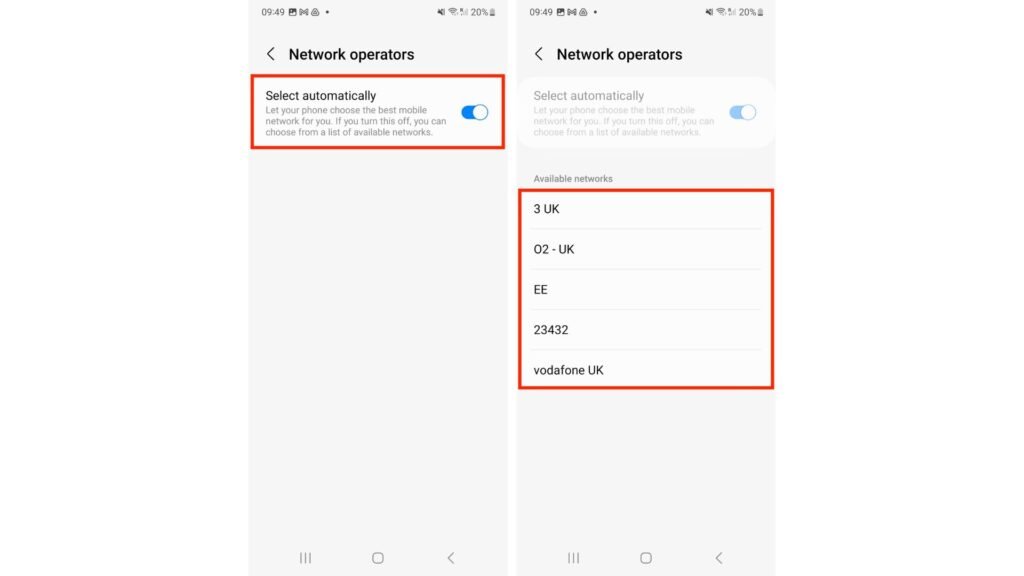
The lock status matters because a locked phone only works with one carrier’s SIM cards. This limits your options when traveling or switching services. Most carriers lock phones that are bought on payment plans until they’re paid off.
If you find your phone is locked, you’ll need to find your IMEI number for the next step in the unlocking process.
Find Your IMEI Number
Every Android phone has a unique IMEI number that carriers use to identify your device. You can find this number by dialing *#06# on your phone keypad. The 15-digit code will pop up on your screen right away.
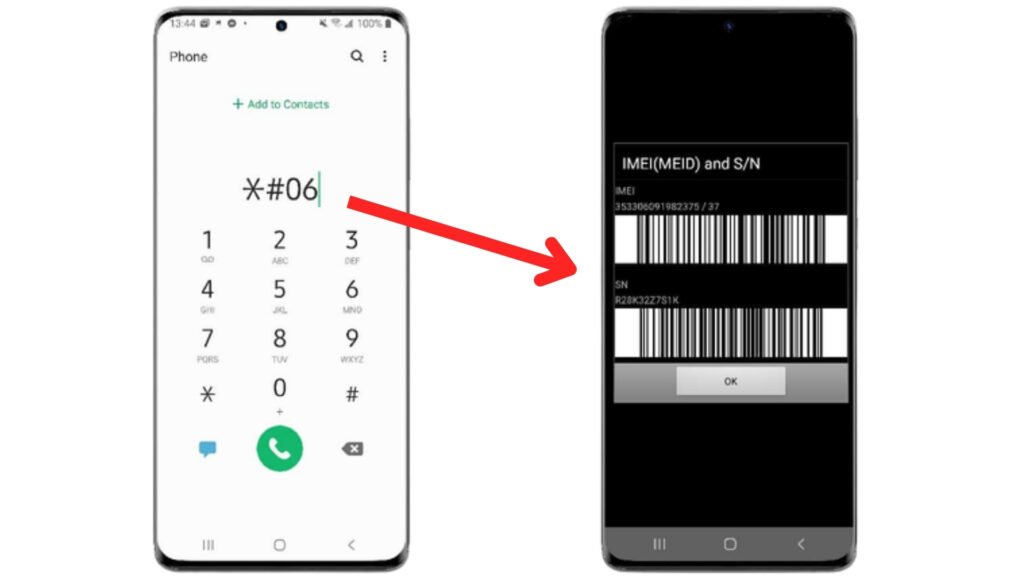
Another easy way to locate your IMEI is through your phone settings. Go to Settings > About Phone > Status (or IMEI information). Some phones also print the IMEI on the SIM tray or under the battery if you have a removable one.
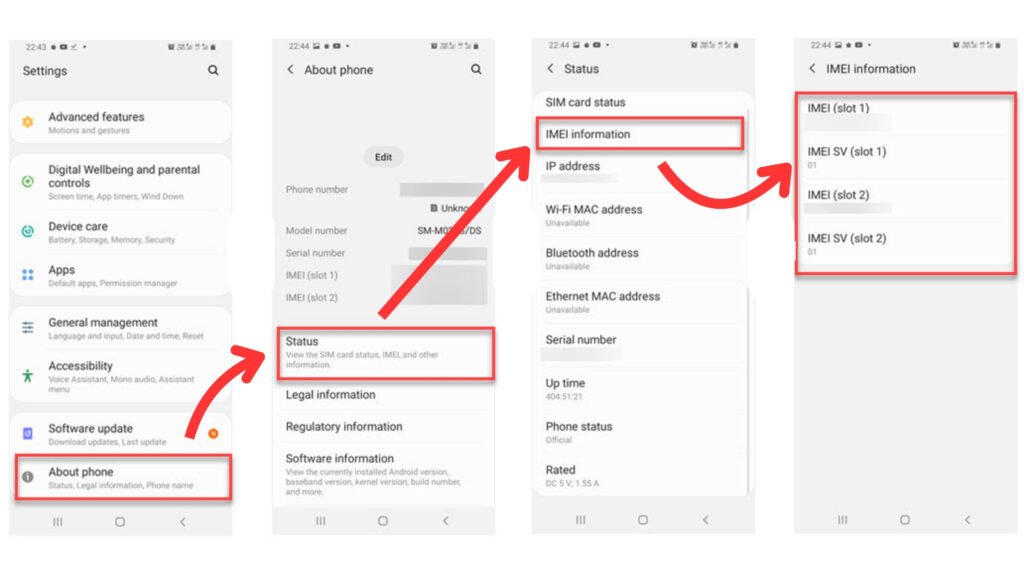
Make sure to write down this number as you’ll need it for the next step in the unlocking process.
Now that you have your IMEI number, you’ll need to check your carrier’s specific unlock policy to move forward.
Determine Your Carrier’s Unlock Policy
Each mobile carrier has its own rules for unlocking Android phone. AT&T requires devices to be paid off and active for 60 days. T-Mobile needs phones to be active for 40 days with all payments complete.
Verizon automatically unlocks most devices after 60 days. Sprint demands devices be active for 50 days and fully paid. You’ll need to check your specific carrier’s website or call customer service to learn their exact requirements.
Some carriers offer free unlocking while others charge fees for this service.
Your carrier might ask for proof of purchase or account details before they approve your unlock request. Most major carriers have online forms where you can submit all needed information.
The next step after learning your carrier’s policy is to submit your official unlock request with all required details.
Submit an Unlock Request
Ready to send your unlock request? Most carriers offer online forms on their websites for this process. You’ll need your IMEI number, account details, and phone model to complete the form.
Some carriers might ask for proof that you’ve paid off your device or met their unlock rules. AT&T users can dial *#06# to get their IMEI and submit requests through their customer portal.
T-Mobile customers can use their app or call 611 from their phone. Verizon phones are often already unlocked, but their support team can help with any issues. After you submit your request, you’ll get an email with next steps or an unlock code.
Now let’s look at what to do after you get your confirmation.
Confirm the Unlock
After you submit your unlock request, you need to check if it worked. Most carriers send a confirmation email or text message when your Android phone is unlocked. You can test the unlock by putting a different carrier’s SIM card in your phone.
If your phone connects to the network and shows signal bars, it worked! Your Android device is now free from its network lock. Some phones might need a restart after you insert the new SIM card.
The unlock process usually takes 24-48 hours to complete. If your phone still shows “Invalid SIM” or won’t connect to the new network, contact your carrier’s customer service for help.
Unlocking your Android phone gives you the freedom to switch carriers or use local SIM cards when traveling.
What If You Can’t Unlock Through Your Carrier?
Sometimes carriers won’t help you unlock your phone. Don’t worry – you still have options that work well.
Option 1: Use a Trusted IMEI Unlocking Service
Trusted IMEI unlocking services offer a simple way to bypass network locks on Android phone. These online services ask for your phone’s IMEI number and carrier details, then send an unlock code for a fee.
Most services like UnlockBase and DoctorSIM cost between $15-50 and unlock your device in 1-3 days. The process works by adding your phone to a global database of approved unlocked devices.
Many users find these services helpful when carriers refuse to unlock their phones. The best services have good reviews, clear pricing, and money-back promises. Make sure to pick a service with good ratings and avoid those asking for remote access to your device.
Your phone will stay unlocked even after software updates once the IMEI is freed.
Option 2: Use Software Tools (For Tech-Savvy Users)
Tech-savvy users might try software tools to bypass Android lock screens. Programs like Dr.Fone and ADB (Android Debug Bridge) can reset screen locks without data loss on some devices.
These tools need a computer connection and basic tech skills to follow the steps correctly. Many free guides exist online showing how to use these programs for different Android versions.
Your success with software tools depends on your phone model and Android version. Some newer phones have better security that blocks these methods. Always back up your data before trying any software unlock method.
Next, let’s look at how to deal with Factory Reset Protection, a common issue after unlocking phones.
Unlocking FRP (Factory Reset Protection): Bonus Tip
Google added Factory Reset Protection to Android phones as a security feature. FRP stops thieves from using your phone after a factory reset. If you forget your Google account details, you might get locked out of your own device.
To bypass FRP, try using your Google account that was last used on the phone. Enter your email and password when prompted after a reset. For older Android versions, you can tap the back button several times on the setup screen and access the browser to sign in to your Google account.
Some Android phones let you disable FRP before resetting – just go to Settings > Accounts > Google and remove your account first.
Real User Experiences from Reddit, X, and TikTok
Real User Experiences from Reddit, X, and TikTok
On Reddit forums like r/NoContract and r/Android, a recurring tip is: “If you’re buying used, ask the seller for the IMEI and check it first. Too many people buy locked phones thinking they’re good to go.”
TikTok
Scroll through TikTok and you’ll find creators unlocking older Samsung phones using code tricks—some real, some bait. Always double-check comments. Real users often say, “Tried this, didn’t work on my S23. Only official unlock worked.”
X (formerly Twitter)
On X, US users share a common gripe: “Carrier unlocks should be automatic after the phone’s paid off. Why do I still have to jump through hoops?” Totally valid in 2025, honestly.
Conclusion
Unlocking your Android phone opens up new choices for your mobile life. You can switch to a better carrier, use local SIM cards when you travel, or sell your phone for more money. The steps might seem hard at first, but most people can do it with a little help.
Your phone is yours to use as you want, so take control and unlock its full power today. Just make sure to follow the right steps to keep your device safe and working well.
Don’t Miss It: Unlock Any Phone Legally for Free: Safe & Simple Methods
FAQs
Is unlocking legal in the US?
Yes, unlocking Android phone is legal in the United States. The Unlocking Consumer Choice and Wireless Competition Act made it legal for people to unlock their mobile devices in 2014.
This law allows you to unlock your phone once you’ve paid it off or finished your contract. Phone companies must unlock your device if you meet their requirements. The FCC rules say carriers can’t refuse to unlock phones for valid requests or charge extra fees for this service.
Many phone users don’t know about this legal right to switch networks with their existing device.
Will unlocking void your warranty? Let’s find out next.
Will unlocking void my warranty?
Unlocking your Android phone usually won’t void your warranty for hardware issues. Most manufacturers separate network unlocking from hardware coverage. Your Samsung, Google Pixel, or other Android device will still be covered for screen cracks or battery problems after unlocking.
The FCC rules protect consumers who unlock their mobile devices legally. But be careful – using third-party software tools for unlocking might affect your warranty. Some carriers may claim warranty violations if you unlock before your contract ends.
Always check your specific carrier’s policy before proceeding with any unlocking method.
How long does the process take?
Carrier unlocking times vary greatly. Most carriers process unlock requests in 2-7 business days. AT&T often completes unlocks within 48 hours, while T-Mobile might take up to a week.
Third-party IMEI services can unlock Android phones faster, sometimes within hours, but cost $20-50. The actual unlock process takes just minutes once you receive your code. Your phone’s age and payment status affect timing too.
Paid-off devices unlock faster than phones still on payment plans. The fastest option remains using your original carrier if your account is in good standing.
Can I unlock a phone I still owe money on?
Unlocking a phone you’re still paying for is tricky. Most carriers won’t unlock devices with active payment plans. Your phone acts as collateral for the money you owe. You must first pay off your device fully before requesting an unlock code.
Some third-party services claim they can unlock phones with active payments, but this may break your contract terms. The legal risks include possible service cuts and even debt collection actions.
Breaking carrier rules might seem tempting, but it can hurt your credit score. Your best path is to finish your payments or talk to your carrier about early payoff options. Many companies offer payoff deals if you switch to their network.
This keeps your phone access legal and your account in good standing.
What’s the difference between unlocking and jailbreaking?
Unlocking and jailbreaking are two different processes. Unlocking your Android phone means freeing it from a specific carrier network so you can use it with any SIM card. This affects only the network settings and doesn’t change how your phone works.
Jailbreaking (more common with iPhones) or rooting (for Android) goes much deeper. It breaks through the phone’s core security to let you install apps not found in official stores and change system files.
This can void your warranty and might make your phone less secure.


